


I was overly reluctant…
…to join in to the Twitter party because I didn’t think I needed yet another “social network.” To be honest, I didn’t know what Twitter was- I thought it was another Facebook where you write on walls, poke people and have to filter a billion strangers requesting to be your “friend” (okay, maybe hundreds, not billions, I’m not that popular).
I was wrong…
…twitter is not quite instant messaging, but is similar in that you “follow” people and they “follow” you and in under 140 characters, you summarize what you’re doing, what you’re reading, what you’re blogging, or what you’re thinking. It satisfies my need for instant gratification as the community shares in discussion.
Part of the fear…
…of trying a new technology is not just the learning curve, but the fear of something new- if tech savvy people are using it, it must be complicated, right? Wrong. Let’s just break through that fear and set up a Twitter account, shall we? Follow along to set up your account (and if you’re in an overexcited rush, skip the “details” section of each step’s instructions).
[STEP ONE]
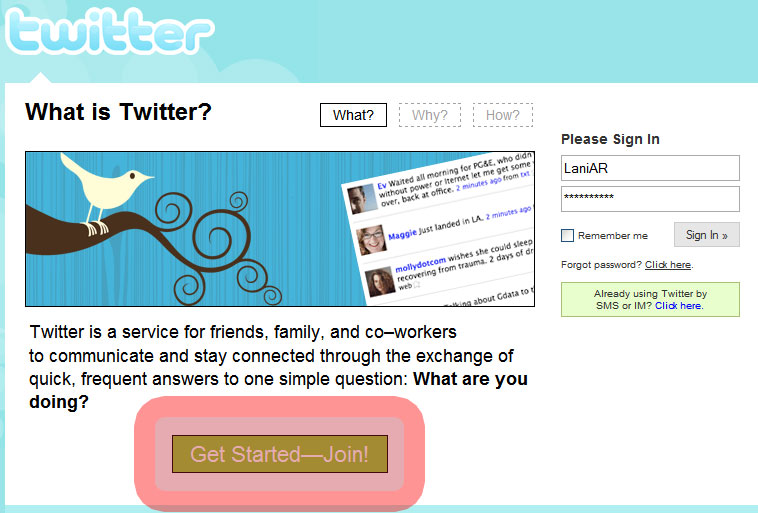
Go to https://twitter.com right now. You’ll see the screen below, click the green “Get Started-Join” button. (Details: this is where you’ll come to log in next time, so remember your chosen “user name” and password.)

[STEP TWO]
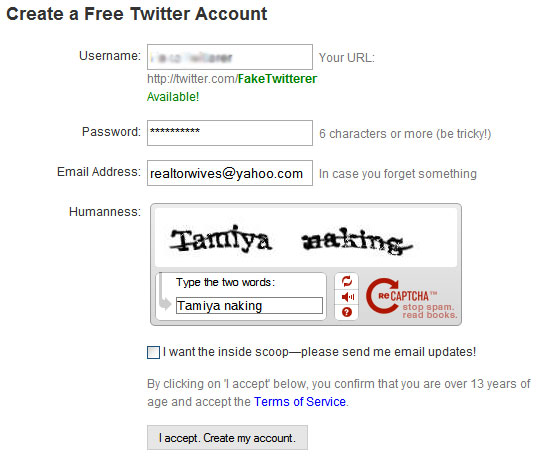
Select a username (it will tell you immediately if it’s available), password, valid email address for updates to be sent to (I suggest a primary email), enter the captcha and permit or deny Twitter to email you news. Click accept. (Details: I suggest using a short, memorable username with your name in it unless you have a nickname that you’re willing to allow clients to see. I suggest your primary email as the signup because you may need your Twitter messages from other users to go there.)

[STEP THREE]
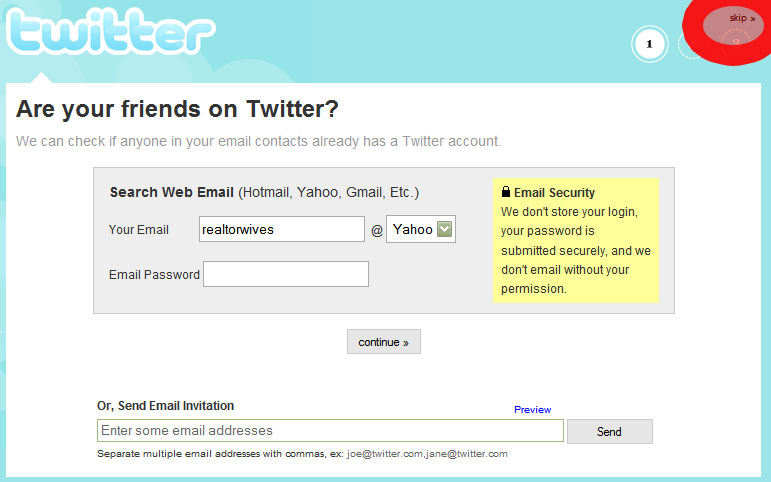
Here, you’ll either (1) log in to your email and see if your contacts there are also on Twitter, OR do as I do and (2) click the hidden “skip” button in the upper right corner. In Step Twelve, I’ll show you how to instantly have nearly 100 Twitter friends. (Details: I suggest skipping this step and going back to it to insure you haven’t missed anyone.)

[STEP FOUR]
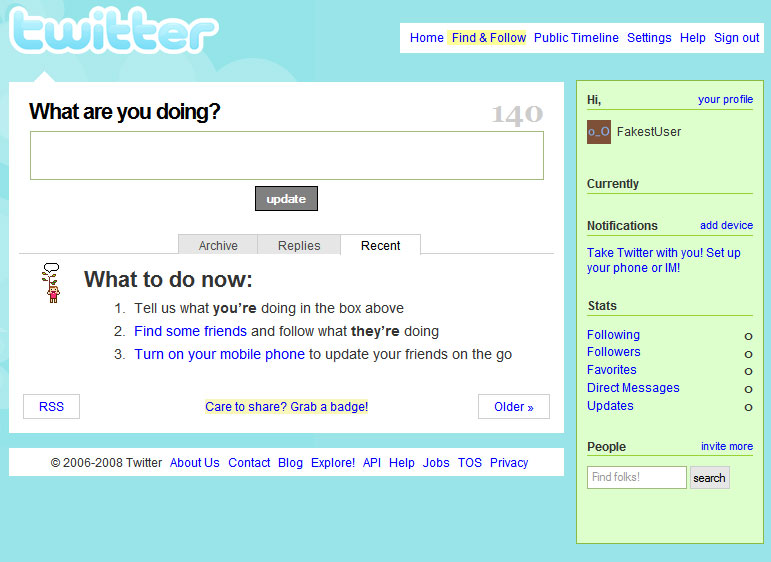
Now you have a Twitter account. This is your “dashboard.” Time to customize your dashboard and to set up your information for viewers to see by clicking “Settings” in the upper right corner.

[STEP FIVE]
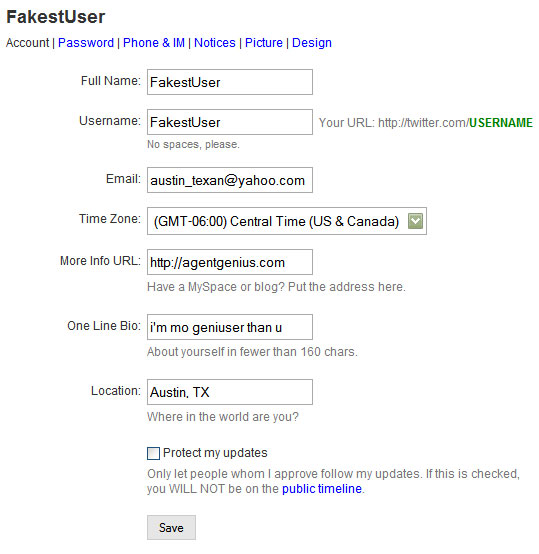
Automatically, you’re in the “Account” panel. You can publish your real name here, tell Twitter your time zone, enter your URL (blog, website, whatever you want people to be directed to which is visible to the public), a quick bio (being clever is great) and your location. (Details: all this info is accessible to the public. You DO have the option to make your updates (your “twits”) private meaning you have to give permission for people to see what you’re doing and when. I think this is a barrier to the community, so I don’t suggest it unless you get a large following of stalkers.)

[STEP SIX]
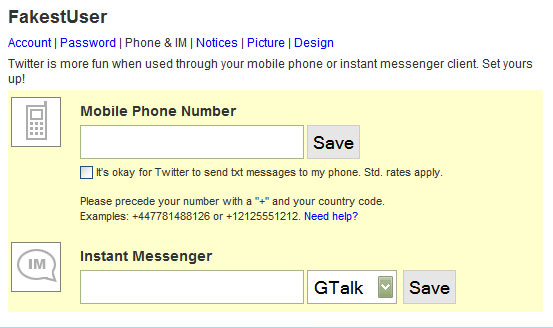
Up top, click “Phone & IM.” Some people have their Twitter set up with their cell phone (or instant messenger) so they can see when someone has directly messaged them, but I steer clear because I enjoy being married. (Details: text messaging rates apply, so if you plan on using this method, check on your texting package with your cell provider. My “following” is too big and too active to have it set up on my phone, but I will temporarily have it on text for conferences like REBarCamp08 or SXSWi.)

[STEP SEVEN]
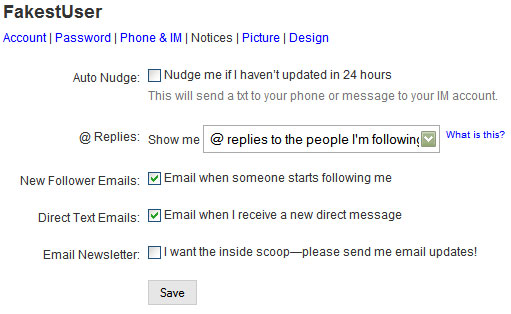
Up top, click “Notices.” Select the options for what level of notifications you want sent to your email or phone. (Details: you can come back and change this as your “following” grows, it’s flexible.)

[STEP EIGHT]
Up top, click “Picture.” Upload a picture of yourself or your logo (the popular way is a picture). I uploaded this chick because she’s cute- that’s not me, that’s FakestUser. This picture will be your avatar next to every “twit” message you send out.


[STEP NINE]
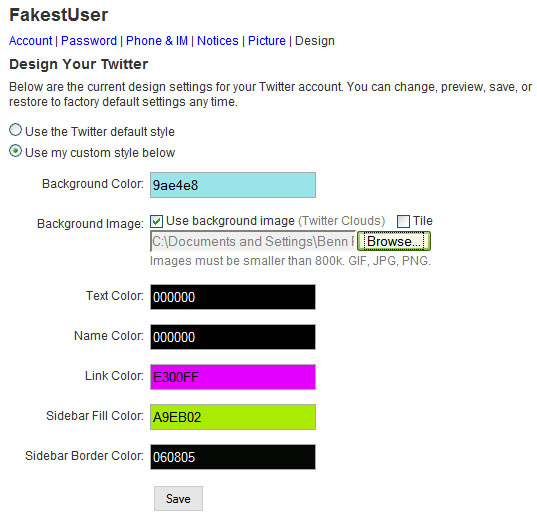
Up top, click “Design.” This will customize your dashboard and will show people a personal side of you, so don’t be stiff and corporate, be fun! By clicking on any of the colors, you can select a new color on the color map. It may take a few tries, but you’ll get a great combo! (Details: I also LOVE using a background image and I change it frequently. If it’s a small image, make sure to tile it or it’ll be a tiny pic in the corner.)

[STEP TEN]
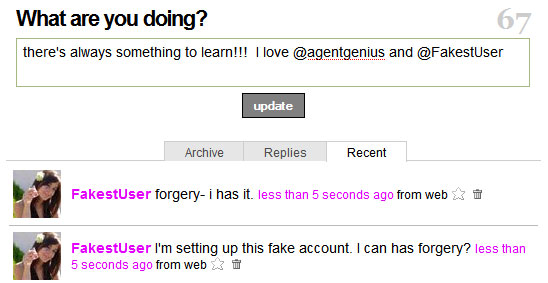
Click “Home” to get back to your Dashboard to see what damage you’ve done! Twitter always asks “what are you doing?” and in 140 characters, you get to tell the world! (Details: Here, I typed “I’m setting up this fake account. I can has forgery?” and see the number 87 in the corner? That’s how many characters I have left- it counts down for me!)


[STEP ELEVEN]
Now you’re a twitterer and you twit with your twitbuds! To twit with someone, the @ sign before their screen name alerts them that you’re talking to them.

[STEP TWELVE]
The way you can immediately connect with the blogiverse is to go to twitter.com/agentgenius and click the follow button. Following AG on Twitter is great because your twitter messages will become instant links in the G-Feeds (check it out now!) in real time! Agent Genius is not just a blogging community but a micro-blogging community where anyone can check out live what is going on at any given moment which expands our content exponentially.
Now, you can see everything agentgenius is twittering and when they follow you back, you can then see each other. Then, on the right of the agentgenius sidebar, click the word “following” to see who agentgenius is following. There, you can click “follow” all day long! Remember, some will and some won’t follow in return- they may not be using Twitter frequently or they may not know you (like if you follow Britney Spears or something).
In 12 steps, you’ve paved your own way to a new social network! *New* Twits- tell us your new Twitter screen name in the comments after you’ve followed agentgenius! Coming up is an array of tools that will rock out your new Twit life.


