

Saturday, February 7, 2026

Unlock AG Pro Today

Why Now?

AG Pro gives you sharp insights, compelling stories, and weekly mind fuel without the fluff. Think of it as your brain’s secret weapon – and our way to keep doing what we do best: cutting the BS and giving you INDEPENDENT real talk that moves the needle.

Limited time offer: $29/yr (regularly $149)
✔ Full access to all stories and 20 years of analysis
✔ Long-form exclusives and sharp strategy guides
✔ Weekly curated breakdowns sent to your inbox

We accept all major credit cards.

Pro

/ once per week

Get everything, no strings.

AG-curious? Get the full-access version, just on a week-to-week basis.
• Unlimited access, no lockouts
• Full Premium archive access
• Inbox delivery + curated digests
• Stop anytime, no hoops

$
7
$
0

Get your fill of no-BS brilliance.

Pro

/ once per year

All in, all year. Zero lockouts.

The best deal - full access, your way. No timeouts, no limits, no regrets.
A year for less than a month of Hulu+
• Unlimited access to every story
• Re-read anything, anytime
• Inbox drop + curated roundups

$
29
$
0

*Most Popular

Full access, no pressure. Just power.

Free
/ limited

Useful, just not unlimited.

You’ll still get the goods - just not the goodest, freshest goods. You’ll get:
• Weekly email recaps + curation
• 24-hour access to all new content
• No archive. No re-reads

Free

Upgrade later -
we’ll be here!

Unlock AG Pro Today

Why Now?

AG Pro gives you sharp insights, compelling stories, and weekly mind fuel without the fluff. Think of it as your brain’s secret weapon – and our way to keep doing what we do best: cutting the BS and giving you INDEPENDENT real talk that moves the needle.

Limited time offer: $29/yr (regularly $149)
✔ Full access to all stories and 20 years of analysis
✔ Long-form exclusives and sharp strategy guides
✔ Weekly curated breakdowns sent to your inbox

We accept all major credit cards.

Pro

/ once per week

Get everything, no strings.

AG-curious? Get the full-access version, just on a week-to-week basis.
• Unlimited access, no lockouts
• Full Premium archive access
• Inbox delivery + curated digests
• Stop anytime, no hoops

$
7
$
0

Get your fill of no-BS brilliance.

Pro

/ once per year

All in, all year. Zero lockouts.

The best deal - full access, your way. No timeouts, no limits, no regrets.
A year for less than a month of Hulu+
• Unlimited access to every story
• Re-read anything, anytime
• Inbox drop + curated roundups

$
29
$
0

*Most Popular

Full access, no pressure. Just power.

Free
/ limited

Useful, just not unlimited.

You’ll still get the goods - just not the goodest, freshest goods. You’ll get:
• Weekly email recaps + curation
• 24-hour access to all new content
• No archive. No re-reads

Free

Upgrade later -
we’ll be here!

33 creative Twitter cover photos, install one with two clicks

Twitter Cover Photos

First Facebook added a cover photo option to profiles, then recently, Twitter and LinkedIn jumped on board as well, making the new social media industry standard to have a large banner-sized image at the top of every user’s profile. Some people have added custom images and gotten quite creative, while others may lack the technical skill or simply the time and energy to add their own Twitter cover photo.

That’s where TwitrCovers.com comes in. The website has a large gallery of images to choose from that any professional can use. Typically, cover photo generators, like those you may have seen for Facebook, come with watermarks all over the image of the website it was uploaded from, or the photos are low quality, or more commonly, the images just aren’t appropriate for professional users. Not so with TwitrCovers. We liked them so much that we’ve highlighted 33 of the 100ish options from the site.

As seen in the image below, you can manually upload one of the high resolution images to your profile yourself, or you can do what we did, and click the first option, the big blue bar underneath the image:

If you opt to click the blue button to automatically make it your Twitter cover photo, it will then take you to permissions and ask you as a signed in Twitter user to authorize their uploading the photo for you. Hint: what we did was say yes, allow the app to do its magic, then go into Settings, then on the left clicked Apps, and found the TwitrCover app and clicked the Revoke Access button, so it no longer had access to our accounts. The cover photo on our profiles stayed, and their permission went away, leaving us feeling secure.
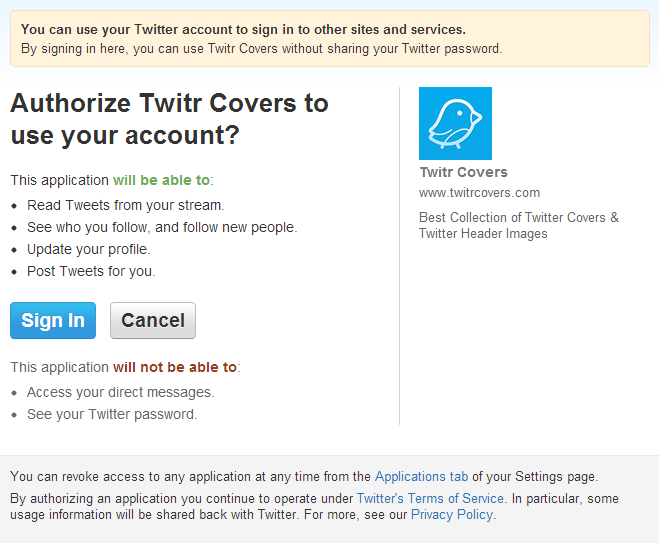
After granting permission, it redirected us, then you’re done.

Below is the final product which took under one minute to install:

33 Twitter cover photos

Scroll through this quick taste of what the website has to offer, and if you see an image you like and want to use, click on it, and it will open in another tab where you can then install it as outlined above. Although it is ideal to use your own custom image with branding or something unique, the next best thing and the fastest option for you may be below:


Lani Rosales, Managing Editor & Lead Business Writerhttps://theamericangenius.com/author/lani
Lani was the first hire at The American Genius, has co-authored a book, co-founded BASHH, Austin Digital Jobs, Remote Digital Jobs, and is a seasoned business writer and editorialist with a penchant for the irreverent.

7 COMMENTS

Subscribe
Notify of
wpDiscuz
7
0
What insights can you add? →x
()
x
Exit mobile version
