Tuesday, December 23, 2025

Unlock AG Pro Today

Why Now?

AG Pro gives you sharp insights, compelling stories, and weekly mind fuel without the fluff. Think of it as your brain’s secret weapon – and our way to keep doing what we do best: cutting the BS and giving you INDEPENDENT real talk that moves the needle.

Limited time offer: $29/yr (regularly $149)
✔ Full access to all stories and 20 years of analysis
✔ Long-form exclusives and sharp strategy guides
✔ Weekly curated breakdowns sent to your inbox

We accept all major credit cards.

Pro

/ once per week

Get everything, no strings.

AG-curious? Get the full-access version, just on a week-to-week basis.
• Unlimited access, no lockouts
• Full Premium archive access
• Inbox delivery + curated digests
• Stop anytime, no hoops

$
7
$
0

Get your fill of no-BS brilliance.

Pro

/ once per year

All in, all year. Zero lockouts.

The best deal - full access, your way. No timeouts, no limits, no regrets.
A year for less than a month of Hulu+
• Unlimited access to every story
• Re-read anything, anytime
• Inbox drop + curated roundups

$
29
$
0

*Most Popular

Full access, no pressure. Just power.

Free
/ limited

Useful, just not unlimited.

You’ll still get the goods - just not the goodest, freshest goods. You’ll get:
• Weekly email recaps + curation
• 24-hour access to all new content
• No archive. No re-reads

Free

Upgrade later -
we’ll be here!

Unlock AG Pro Today

Why Now?

AG Pro gives you sharp insights, compelling stories, and weekly mind fuel without the fluff. Think of it as your brain’s secret weapon – and our way to keep doing what we do best: cutting the BS and giving you INDEPENDENT real talk that moves the needle.

Limited time offer: $29/yr (regularly $149)
✔ Full access to all stories and 20 years of analysis
✔ Long-form exclusives and sharp strategy guides
✔ Weekly curated breakdowns sent to your inbox

We accept all major credit cards.

Pro

/ once per week

Get everything, no strings.

AG-curious? Get the full-access version, just on a week-to-week basis.
• Unlimited access, no lockouts
• Full Premium archive access
• Inbox delivery + curated digests
• Stop anytime, no hoops

$
7
$
0

Get your fill of no-BS brilliance.

Pro

/ once per year

All in, all year. Zero lockouts.

The best deal - full access, your way. No timeouts, no limits, no regrets.
A year for less than a month of Hulu+
• Unlimited access to every story
• Re-read anything, anytime
• Inbox drop + curated roundups

$
29
$
0

*Most Popular

Full access, no pressure. Just power.

Free
/ limited

Useful, just not unlimited.

You’ll still get the goods - just not the goodest, freshest goods. You’ll get:
• Weekly email recaps + curation
• 24-hour access to all new content
• No archive. No re-reads

Free

Upgrade later -
we’ll be here!

Create charts on-the-go with this simple chart creation tool

Tinychart solves your charting problem

Having a visual aid for a presentation can be the difference between getting your message across, and your meeting attendees falling asleep. Charts and graphs are effective at getting your conveying facts and figures, but creating several, especially on-the-go, can be a hassle.


You can’t get the rows to align, the color is wrong, and a million other problems can present themselves when finalizing your data. Now, there’s a simple program that lets you create charts without downloading or installing a single thing.

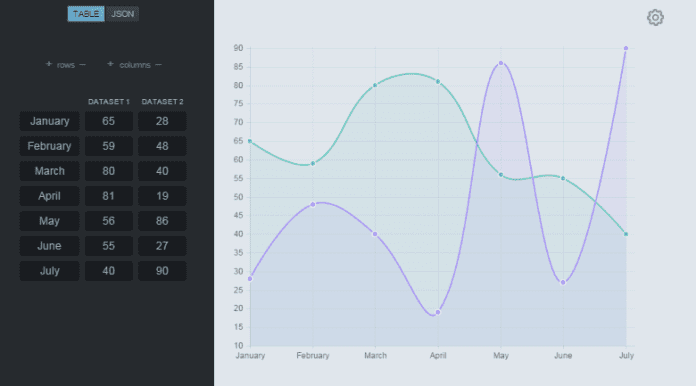
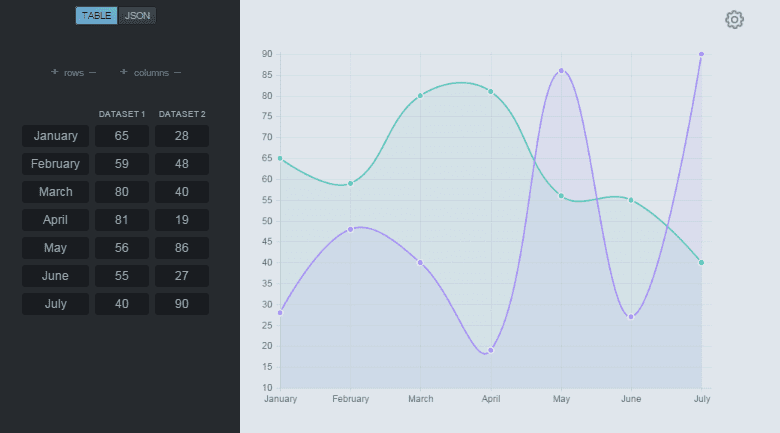
Tinychart is a simplified, easy-to-use, chart creation tool. Simply use the plus and minus signs to add and subtract columns and rows to customize your chart to the size you need. Enter your data into the corresponding button fields, and your chart will be created. It really is that simple. No aligning. No tabbing between fields, just a simple chart with no fuss.

Best uses for Tinychart

For example if you need a yearly overview chart, you’ll enter each month in a button field and all your other variables and Tinychart does all the generating work for you. This is so much faster than trying to align and perfect all those columns and rows on your own. Especially if you’re already under pressure for a presentation.

Of course this chart is fairly basic. There’s nothing super fancy. You cannot change the colors, outlines, or fonts, but you can change from a line graph to a bar graph by clicking in the upper right corner and accessing the “settings” wheel. You can also completely reset and clear your data from the settings section as well.

Settings is also where you’ll need to click to download and save your chart, if needed. While this tool can’t replace complex charts, with multiple features, it is a good solution for quick and easy visual aids on-the-go, without the hassle of accessing a separate program.

#Tinychart

Jennifer Walpole, Sr. Staff Writer
Jennifer Walpole is a Senior Staff Writer at The American Genius and holds a Master's degree in English from the University of Oklahoma. She is a science fiction fanatic and enjoys writing way more than she should. She dreams of being a screenwriter and seeing her work on the big screen in Hollywood one day.
Subscribe
Notify of
wpDiscuz
0
0
What insights can you add? →x
()
x
Exit mobile version
