Monday, December 22, 2025

Unlock AG Pro Today

Why Now?

AG Pro gives you sharp insights, compelling stories, and weekly mind fuel without the fluff. Think of it as your brain’s secret weapon – and our way to keep doing what we do best: cutting the BS and giving you INDEPENDENT real talk that moves the needle.

Limited time offer: $29/yr (regularly $149)
✔ Full access to all stories and 20 years of analysis
✔ Long-form exclusives and sharp strategy guides
✔ Weekly curated breakdowns sent to your inbox

We accept all major credit cards.

Pro

/ once per week

Get everything, no strings.

AG-curious? Get the full-access version, just on a week-to-week basis.
• Unlimited access, no lockouts
• Full Premium archive access
• Inbox delivery + curated digests
• Stop anytime, no hoops

$
7
$
0

Get your fill of no-BS brilliance.

Pro

/ once per year

All in, all year. Zero lockouts.

The best deal - full access, your way. No timeouts, no limits, no regrets.
A year for less than a month of Hulu+
• Unlimited access to every story
• Re-read anything, anytime
• Inbox drop + curated roundups

$
29
$
0

*Most Popular

Full access, no pressure. Just power.

Free
/ limited

Useful, just not unlimited.

You’ll still get the goods - just not the goodest, freshest goods. You’ll get:
• Weekly email recaps + curation
• 24-hour access to all new content
• No archive. No re-reads

Free

Upgrade later -
we’ll be here!

Unlock AG Pro Today

Why Now?

AG Pro gives you sharp insights, compelling stories, and weekly mind fuel without the fluff. Think of it as your brain’s secret weapon – and our way to keep doing what we do best: cutting the BS and giving you INDEPENDENT real talk that moves the needle.

Limited time offer: $29/yr (regularly $149)
✔ Full access to all stories and 20 years of analysis
✔ Long-form exclusives and sharp strategy guides
✔ Weekly curated breakdowns sent to your inbox

We accept all major credit cards.

Pro

/ once per week

Get everything, no strings.

AG-curious? Get the full-access version, just on a week-to-week basis.
• Unlimited access, no lockouts
• Full Premium archive access
• Inbox delivery + curated digests
• Stop anytime, no hoops

$
7
$
0

Get your fill of no-BS brilliance.

Pro

/ once per year

All in, all year. Zero lockouts.

The best deal - full access, your way. No timeouts, no limits, no regrets.
A year for less than a month of Hulu+
• Unlimited access to every story
• Re-read anything, anytime
• Inbox drop + curated roundups

$
29
$
0

*Most Popular

Full access, no pressure. Just power.

Free
/ limited

Useful, just not unlimited.

You’ll still get the goods - just not the goodest, freshest goods. You’ll get:
• Weekly email recaps + curation
• 24-hour access to all new content
• No archive. No re-reads

Free

Upgrade later -
we’ll be here!

Event Book: your digital calendar re-imagined

Event Book could get you back on task in a jiffy

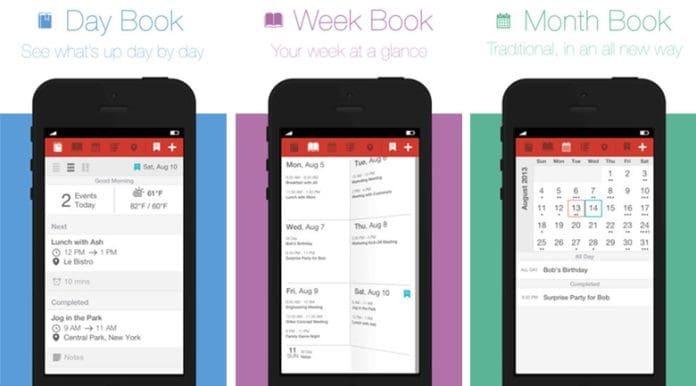
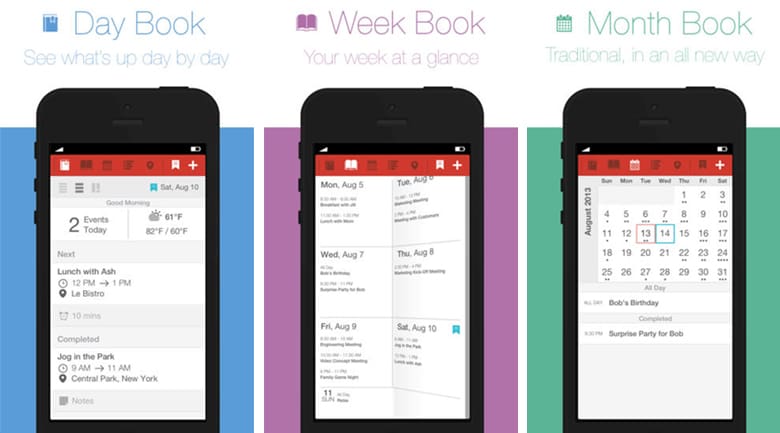
Event Book is designed to replace the default iOS calendar app with a simple, clear, east-to-navigate view of your events and calendars. It offers four different views from the side panel navigation menu: Day Book, Week Book, Month Book, and List Book. By default, all of your events will show up in the Day Book format.

The Day Book

The Day Book will show you an overview of the current day, along with integrated weather information. To create an event, double-tap the day, or click the “+” sign at the top, and fill in your event’s information. You also have a couple of different options on how information is displayed: long format or condensed. In the long format, you will be able to see full event details, like duration, names, etc., but if you prefer a condensed version, you can easily toggle between views. With Day Book, you can see what you have completed, as well as, what is coming up and you can view events and details without clicking on them, so you never have to leave the main screen. Navigation through days is simple: just swipe left or right and the days will flip like pages in a book.

The Week Book, The Month Book

With Week Book, it is pretty much the same, only you can view a full week on one screen, allowing you to quickly see how busy you are each day. You can double-tap on any day to create an event, single tap to delete one. If you need an even broader overview, you can check out the Month Book view. Simply swipe up and down to navigate through additional months. This view shows you up to five weeks at a time and each day you have an event, a dot will appear.

You can choose to have a single dot per day, or allow each event to have its own dot, giving you a visual representation of how busy that day is. So, if you have four events on the 13th, you can choose to have one dot to denote you are busy, or four dots to show you have scheduled four events already. This allows you to efficiently plan meetings, conferences, and time off without ever leaving the main screen.

The List Book

In List Book, you get an overview of all your events and since there are smaller event details; you can see more events with less scrolling. But should you need to scroll, swiping up or down automatically loads the next section of events.

More than just book views

In addition to the four book views, you can tweak themes, update maps, and view the weather. Weather and maps are integrated into the all of the other “books” but you can add frequently used locations to the maps section for easy access, as well as, favorite places to get accurate weather reports. The mapping feature is Apple and Google Maps friendly, so you can use what you like and access it when you need it.

While Event Book does not offer anything particularly earth shaking in terms of calendar function, from a usability standpoint, particularly if you are using it on an iPhone, you see more data in less space, allowing you to plan out your week without leaving the main screen. Event Book is currently free in the app store.

Jennifer Walpole, Sr. Staff Writer
Jennifer Walpole is a Senior Staff Writer at The American Genius and holds a Master's degree in English from the University of Oklahoma. She is a science fiction fanatic and enjoys writing way more than she should. She dreams of being a screenwriter and seeing her work on the big screen in Hollywood one day.
Subscribe
Notify of
wpDiscuz
0
0
What insights can you add? →x
()
x
Exit mobile version
