Saturday, December 20, 2025

Unlock AG Pro Today

Why Now?

AG Pro gives you sharp insights, compelling stories, and weekly mind fuel without the fluff. Think of it as your brain’s secret weapon – and our way to keep doing what we do best: cutting the BS and giving you INDEPENDENT real talk that moves the needle.

Limited time offer: $29/yr (regularly $149)
✔ Full access to all stories and 20 years of analysis
✔ Long-form exclusives and sharp strategy guides
✔ Weekly curated breakdowns sent to your inbox

We accept all major credit cards.

Pro

/ once per week

Get everything, no strings.

AG-curious? Get the full-access version, just on a week-to-week basis.
• Unlimited access, no lockouts
• Full Premium archive access
• Inbox delivery + curated digests
• Stop anytime, no hoops

$
7
$
0

Get your fill of no-BS brilliance.

Pro

/ once per year

All in, all year. Zero lockouts.

The best deal - full access, your way. No timeouts, no limits, no regrets.
A year for less than a month of Hulu+
• Unlimited access to every story
• Re-read anything, anytime
• Inbox drop + curated roundups

$
29
$
0

*Most Popular

Full access, no pressure. Just power.

Free
/ limited

Useful, just not unlimited.

You’ll still get the goods - just not the goodest, freshest goods. You’ll get:
• Weekly email recaps + curation
• 24-hour access to all new content
• No archive. No re-reads

Free

Upgrade later -
we’ll be here!

Unlock AG Pro Today

Why Now?

AG Pro gives you sharp insights, compelling stories, and weekly mind fuel without the fluff. Think of it as your brain’s secret weapon – and our way to keep doing what we do best: cutting the BS and giving you INDEPENDENT real talk that moves the needle.

Limited time offer: $29/yr (regularly $149)
✔ Full access to all stories and 20 years of analysis
✔ Long-form exclusives and sharp strategy guides
✔ Weekly curated breakdowns sent to your inbox

We accept all major credit cards.

Pro

/ once per week

Get everything, no strings.

AG-curious? Get the full-access version, just on a week-to-week basis.
• Unlimited access, no lockouts
• Full Premium archive access
• Inbox delivery + curated digests
• Stop anytime, no hoops

$
7
$
0

Get your fill of no-BS brilliance.

Pro

/ once per year

All in, all year. Zero lockouts.

The best deal - full access, your way. No timeouts, no limits, no regrets.
A year for less than a month of Hulu+
• Unlimited access to every story
• Re-read anything, anytime
• Inbox drop + curated roundups

$
29
$
0

*Most Popular

Full access, no pressure. Just power.

Free
/ limited

Useful, just not unlimited.

You’ll still get the goods - just not the goodest, freshest goods. You’ll get:
• Weekly email recaps + curation
• 24-hour access to all new content
• No archive. No re-reads

Free

Upgrade later -
we’ll be here!

Felt: quickly send tangible, gorgeous “thank you” cards from this iOS app

Time to send out those thank you notes

The holiday season is coming to a close. You’ve most likely exchanged gifts with your family and friends and have begun to enjoy all the new and exciting things you’ve unwrapped. However, there is probably still one task on the top of your to-do list: thank you notes.


If your parents were anything like mine, you know sending out thank you notes after receiving a gift is a custom that never goes out of style. While I long for hand-written correspondence, I also realize the convenience of technology. I have friends that reside outside of the United States and keeping in contact with them at times, is not only difficult, but also expensive.

Felt sends handwritten notes from your iPad, iPhone

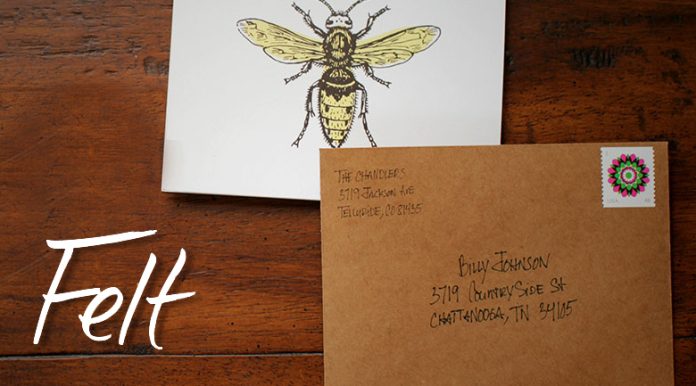
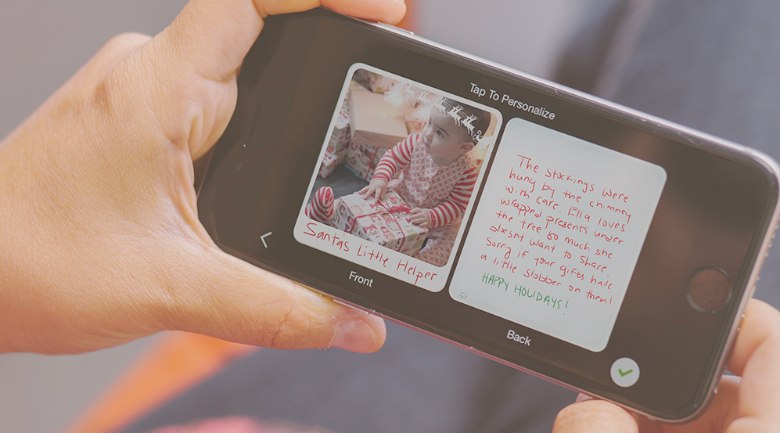
This is where one of my favorite iPad (and now available on iPhone) apps comes in handy: Felt. Felt allows you to digitally create a real, handwritten greeting card and send it. To get started, you’ll select a blank card from tons of options and then add your message in your own handwriting, in a variety of colors. Then, move on to the envelope, also filled out in your own handwriting, and then it’s sent to Felt where they print it on Mohawk paper, seal it up, add a stamp, and mail it out in your custom kraft envelope. It can even be sent internationally for $1 more.

Worried about how your writing will look? Felt recommends using a stylus pen for writing, but when I used my finger it turned out surprisingly well. The iPad app does have a palm rest, so that when you rest your palm on the iPad screen, it does not interfere with your writing.

However, I encountered some problems writing on the envelope because my handwriting tends to be a bit on the large and swirly side. So, I tried it again with a stylus (and more controlled writing) and it turned out just fine. You may have to try a couple times the first time you use the app to get everything the way you want it; after that, it’s a breeze.

Quick, easy way to say thanks

Felt is a quick, easy way to say thank you, without spending an enormous amount of time writing and addressing cards. Not to say that writing and addressing those cards isn’t worth it, but so many times, especially after the holidays, it is difficult to find time to do anything but rest. If this sounds like you, Felt is a great option to say thank you, keep those etiquette points, and prevent stressing yourself out.

If you’d like to see Felt in action, there’s a video for that.

#FeltApp

Jennifer Walpole, Sr. Staff Writer
Jennifer Walpole is a Senior Staff Writer at The American Genius and holds a Master's degree in English from the University of Oklahoma. She is a science fiction fanatic and enjoys writing way more than she should. She dreams of being a screenwriter and seeing her work on the big screen in Hollywood one day.
Subscribe
Notify of
wpDiscuz
0
0
What insights can you add? →x
()
x
Exit mobile version
