Sunday, December 21, 2025

Unlock AG Pro Today

Why Now?

AG Pro gives you sharp insights, compelling stories, and weekly mind fuel without the fluff. Think of it as your brain’s secret weapon – and our way to keep doing what we do best: cutting the BS and giving you INDEPENDENT real talk that moves the needle.

Limited time offer: $29/yr (regularly $149)
✔ Full access to all stories and 20 years of analysis
✔ Long-form exclusives and sharp strategy guides
✔ Weekly curated breakdowns sent to your inbox

We accept all major credit cards.

Pro

/ once per week

Get everything, no strings.

AG-curious? Get the full-access version, just on a week-to-week basis.
• Unlimited access, no lockouts
• Full Premium archive access
• Inbox delivery + curated digests
• Stop anytime, no hoops

$
7
$
0

Get your fill of no-BS brilliance.

Pro

/ once per year

All in, all year. Zero lockouts.

The best deal - full access, your way. No timeouts, no limits, no regrets.
A year for less than a month of Hulu+
• Unlimited access to every story
• Re-read anything, anytime
• Inbox drop + curated roundups

$
29
$
0

*Most Popular

Full access, no pressure. Just power.

Free
/ limited

Useful, just not unlimited.

You’ll still get the goods - just not the goodest, freshest goods. You’ll get:
• Weekly email recaps + curation
• 24-hour access to all new content
• No archive. No re-reads

Free

Upgrade later -
we’ll be here!

Unlock AG Pro Today

Why Now?

AG Pro gives you sharp insights, compelling stories, and weekly mind fuel without the fluff. Think of it as your brain’s secret weapon – and our way to keep doing what we do best: cutting the BS and giving you INDEPENDENT real talk that moves the needle.

Limited time offer: $29/yr (regularly $149)
✔ Full access to all stories and 20 years of analysis
✔ Long-form exclusives and sharp strategy guides
✔ Weekly curated breakdowns sent to your inbox

We accept all major credit cards.

Pro

/ once per week

Get everything, no strings.

AG-curious? Get the full-access version, just on a week-to-week basis.
• Unlimited access, no lockouts
• Full Premium archive access
• Inbox delivery + curated digests
• Stop anytime, no hoops

$
7
$
0

Get your fill of no-BS brilliance.

Pro

/ once per year

All in, all year. Zero lockouts.

The best deal - full access, your way. No timeouts, no limits, no regrets.
A year for less than a month of Hulu+
• Unlimited access to every story
• Re-read anything, anytime
• Inbox drop + curated roundups

$
29
$
0

*Most Popular

Full access, no pressure. Just power.

Free
/ limited

Useful, just not unlimited.

You’ll still get the goods - just not the goodest, freshest goods. You’ll get:
• Weekly email recaps + curation
• 24-hour access to all new content
• No archive. No re-reads

Free

Upgrade later -
we’ll be here!

Flow is Microsoft’s version of IFTTT; it’s worth checking out

Teaching your devices to interact

For years, we’ve profiled IFTTT which stands for “If This, Then That,” referring to the conditional commands you use to automatic specific functions. For example, “If I post a picture on Instagram, then save it my Dropbox.” Or, “if the temperature drops below 50 degrees, then turn on the thermostat.”

You make the rules

IFTTT “recipes” are a great way to connect functions between different devices based on rules that you create. It’s kind of basic if you think about it, and yet there wasn’t an easy way to do it before IFTTT.

These days, tech companies are scrambling to create ever-smarter devices that learn to anticipate your behavior and needs. In the meantime, IFTTTs are a great way to program your devices to interact in ways that save you time and hassle.

Microsoft is on the Flow train

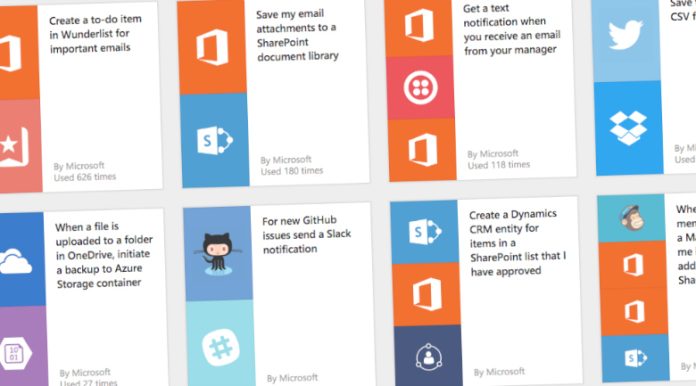
Microsoft has caught onto the IFTTT trend, creating its own service called Flow that helps you “create automated workflows between your favorite apps and services to get notifications, synchronize files, collect data, and more.”

Flow can be programmed to complete hundreds of IFTTT style operations – the only limit is your imagination.

Flows can “instantly deal” with emails, notifications, file shares, or anything else that happens online or on a device. It can be used to connect Office 365, Twitter, OneDrive, Dropbox, Google Drive, Slack, MailChimp, GitHub, Salesforce, and more.

So, what can you do with it?

Microsoft, as well as independent developers, have also created handy guides to give you ideas about ways that your apps could connect. Some templates help you get notifications. For example, you might want to receive a text message any time your boss sends you an email.

Some flow functions are used to synchronize your files between programs like OneDrive, Dropbox, and Google Drive. Others automate the collection of data, for example, by saving tweets into a spreadsheet, or saving contact information across all of your devices and software.

You can also set up functions that require your approval. For example, you may want to add new members from your MailChimp list to your SharePoint list, but only if you OK it first.

Smart devices are great, but only you know exactly what you need your devices to do for you. Microsoft Flow is one way to help streamline your experience.

#MicrosoftFlow

Ellen Vessels, Staff Writerhttps://www.linkedin.com/in/ellenvessels
Ellen Vessels, a Staff Writer at The American Genius, is respected for their wide range of work, with a focus on generational marketing and business trends. Ellen is also a performance artist when not writing, and has a passion for sustainability, social justice, and the arts.

1 COMMENT

Subscribe
Notify of
wpDiscuz
1
0
What insights can you add? →x
()
x
Exit mobile version
