Thursday, January 15, 2026

Unlock AG Pro Today

Why Now?

AG Pro gives you sharp insights, compelling stories, and weekly mind fuel without the fluff. Think of it as your brain’s secret weapon – and our way to keep doing what we do best: cutting the BS and giving you INDEPENDENT real talk that moves the needle.

Limited time offer: $29/yr (regularly $149)
✔ Full access to all stories and 20 years of analysis
✔ Long-form exclusives and sharp strategy guides
✔ Weekly curated breakdowns sent to your inbox

We accept all major credit cards.

Pro

/ once per week

Get everything, no strings.

AG-curious? Get the full-access version, just on a week-to-week basis.
• Unlimited access, no lockouts
• Full Premium archive access
• Inbox delivery + curated digests
• Stop anytime, no hoops

$
7
$
0

Get your fill of no-BS brilliance.

Pro

/ once per year

All in, all year. Zero lockouts.

The best deal - full access, your way. No timeouts, no limits, no regrets.
A year for less than a month of Hulu+
• Unlimited access to every story
• Re-read anything, anytime
• Inbox drop + curated roundups

$
29
$
0

*Most Popular

Full access, no pressure. Just power.

Free
/ limited

Useful, just not unlimited.

You’ll still get the goods - just not the goodest, freshest goods. You’ll get:
• Weekly email recaps + curation
• 24-hour access to all new content
• No archive. No re-reads

Free

Upgrade later -
we’ll be here!

Unlock AG Pro Today

Why Now?

AG Pro gives you sharp insights, compelling stories, and weekly mind fuel without the fluff. Think of it as your brain’s secret weapon – and our way to keep doing what we do best: cutting the BS and giving you INDEPENDENT real talk that moves the needle.

Limited time offer: $29/yr (regularly $149)
✔ Full access to all stories and 20 years of analysis
✔ Long-form exclusives and sharp strategy guides
✔ Weekly curated breakdowns sent to your inbox

We accept all major credit cards.

Pro

/ once per week

Get everything, no strings.

AG-curious? Get the full-access version, just on a week-to-week basis.
• Unlimited access, no lockouts
• Full Premium archive access
• Inbox delivery + curated digests
• Stop anytime, no hoops

$
7
$
0

Get your fill of no-BS brilliance.

Pro

/ once per year

All in, all year. Zero lockouts.

The best deal - full access, your way. No timeouts, no limits, no regrets.
A year for less than a month of Hulu+
• Unlimited access to every story
• Re-read anything, anytime
• Inbox drop + curated roundups

$
29
$
0

*Most Popular

Full access, no pressure. Just power.

Free
/ limited

Useful, just not unlimited.

You’ll still get the goods - just not the goodest, freshest goods. You’ll get:
• Weekly email recaps + curation
• 24-hour access to all new content
• No archive. No re-reads

Free

Upgrade later -
we’ll be here!

Free tool boosts productivity with an email pause button

Boost productivity, reject distractions

If you’re the type of person who gets distracted easily, email notifications are the bane of your work existence. When you’re trying to finish a rush project due at the end of the day and an email pops up, it diverts your attention away from the task at hand and sets you farther behind. Email is a useful method of office communication, but there are times when you want to actually get work done as opposed to being bombarded with emails you’re copied on but don’t actually need to be. So how do you find a happy medium?

It’s obvious that you can’t simply do away with checking email because there are times when your input is needed in order for something to move forward. But if you’re heading home for the evening or going on vacation, you may want emails to be less of a priority. But how can you zen out when your desktop or phone screen is filled with email notifications? Google Chrome extension, Inbox Pause, lets users pause the receipt of emails during times that they want to relax, or if at work, block off time where they can focus on a project with no email interruptions.

How Pause Inbox works

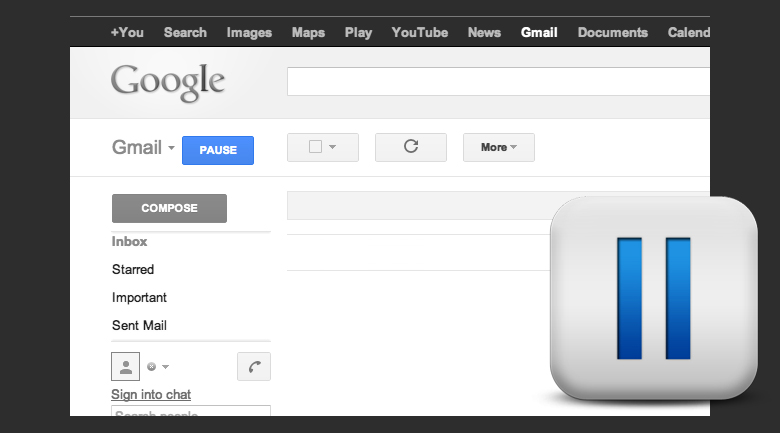
Once the extension is installed, a blue pause button appears in the toolbar. Users press the button and any emails received will move to a new label (for example September 12th Paused Emails). Once you’re ready to receive email again, click “unpause” and the emails you received during the break will move into your inbox.

Of course there are other ways to stop constant checking of emails, like minimizing the screen or turning off email notifications on your phone. But for those who still feel tempted to take a peak, Inbox Pause is a great option because it delays any emails coming into your inbox and holds them in a separate folder that users won’t be able to see until they unpause the extension. With no new emails to check, users can focus on work tasks or enjoy dinner with a loved without being distracted.

Having constant access to work conversation is ideal for staying up to date, but for the times when you need to drill down and focus, consider putting your emails on pause to add some uninterrupted time back into your day.

Bonus: Inbox Pause comes to you from the makers of Boomerang for Gmail, which most AGBeat team members actually use every day.

Destiny Bennett, Staff Writer
Destiny Bennett is a journalist who has earned double communications' degrees in Journalism and Public Relations, as well as a certification in Business from The University of Texas at Austin. She has written stories for AustinWoman Magazine as well as various University of Texas publications and enjoys the art of telling a story. Her interests include finance, technology, social media...and watching HGTV religiously.

3 COMMENTS

Subscribe
Notify of
wpDiscuz
3
0
What insights can you add? →x
()
x
Exit mobile version
