



LinkedIn Intro launches and is awesome
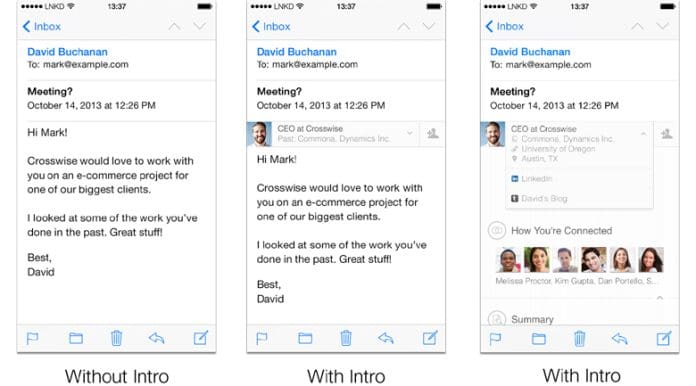
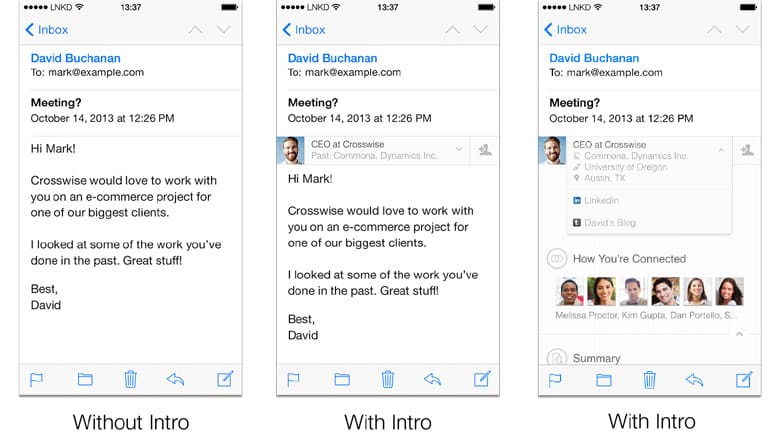
LinkedIn Intro, launched today, puts the power of LinkedIn profiles right inside of your email, as seen in the image above, finally making full use of the company’s 2012 acquisition of Rapportive, which would pull in data on who you were emailing with, displaying it in the sidebar of Gmail. Intro now makes this possible in the iOS mail app, with no word on when it will become available for Android users or on desktop.
When using the iOS mail app on your phone, with LinkedIn Intro, you’ll be presented with a photo, job title, and company of the person emailing you, nestled right into your email. When clicked, you can see that person’s full LinkedIn bio and your mutual connections right then and there, even offering you links to their blog to give you instant context.
Video tour of LinkedIn Intro
[pl_video type=”youtube” id=”77sh3jwB7pQ”]
Why this tool is so powerful
When was the last time a stranger emailed you about something? Today? Probably today. Imagine if you knew instantly their professional information, credentials, and common connections. Or imagine if someone emailed you that you haven’t spoken with in a while, but because you already know them, you may not have caught that they’ve changed jobs or been promoted – LinkedIn Intro solves that instantly and makes you a more informed emailer.
The app can be turned off and on right from your phone’s settings, or from the Intro app button on your home screen, and setup is minimal. Without infringing on the valuable screen real estate on your iPhone, Intro crams the most relevant information into a very small, yet beautiful space and will most definitely help users to become better communicators.


