Friday, January 16, 2026

Unlock AG Pro Today

Why Now?

AG Pro gives you sharp insights, compelling stories, and weekly mind fuel without the fluff. Think of it as your brain’s secret weapon – and our way to keep doing what we do best: cutting the BS and giving you INDEPENDENT real talk that moves the needle.

Limited time offer: $29/yr (regularly $149)
✔ Full access to all stories and 20 years of analysis
✔ Long-form exclusives and sharp strategy guides
✔ Weekly curated breakdowns sent to your inbox

We accept all major credit cards.

Pro

/ once per week

Get everything, no strings.

AG-curious? Get the full-access version, just on a week-to-week basis.
• Unlimited access, no lockouts
• Full Premium archive access
• Inbox delivery + curated digests
• Stop anytime, no hoops

$
7
$
0

Get your fill of no-BS brilliance.

Pro

/ once per year

All in, all year. Zero lockouts.

The best deal - full access, your way. No timeouts, no limits, no regrets.
A year for less than a month of Hulu+
• Unlimited access to every story
• Re-read anything, anytime
• Inbox drop + curated roundups

$
29
$
0

*Most Popular

Full access, no pressure. Just power.

Free
/ limited

Useful, just not unlimited.

You’ll still get the goods - just not the goodest, freshest goods. You’ll get:
• Weekly email recaps + curation
• 24-hour access to all new content
• No archive. No re-reads

Free

Upgrade later -
we’ll be here!

Unlock AG Pro Today

Why Now?

AG Pro gives you sharp insights, compelling stories, and weekly mind fuel without the fluff. Think of it as your brain’s secret weapon – and our way to keep doing what we do best: cutting the BS and giving you INDEPENDENT real talk that moves the needle.

Limited time offer: $29/yr (regularly $149)
✔ Full access to all stories and 20 years of analysis
✔ Long-form exclusives and sharp strategy guides
✔ Weekly curated breakdowns sent to your inbox

We accept all major credit cards.

Pro

/ once per week

Get everything, no strings.

AG-curious? Get the full-access version, just on a week-to-week basis.
• Unlimited access, no lockouts
• Full Premium archive access
• Inbox delivery + curated digests
• Stop anytime, no hoops

$
7
$
0

Get your fill of no-BS brilliance.

Pro

/ once per year

All in, all year. Zero lockouts.

The best deal - full access, your way. No timeouts, no limits, no regrets.
A year for less than a month of Hulu+
• Unlimited access to every story
• Re-read anything, anytime
• Inbox drop + curated roundups

$
29
$
0

*Most Popular

Full access, no pressure. Just power.

Free
/ limited

Useful, just not unlimited.

You’ll still get the goods - just not the goodest, freshest goods. You’ll get:
• Weekly email recaps + curation
• 24-hour access to all new content
• No archive. No re-reads

Free

Upgrade later -
we’ll be here!

OneNote Windows app now makes note taking easier, more natural

OneNote for Windows gets a major update

OneNote announced an update to the free OneNote Windows Store app that significantly improves how your capture, find, and view the notes you care about most. The update was inspired by the new Windows 8.1 and the new mobile devices that are used in conjunction with stylus pens; like the Surface Pro and Dell Venue.

This update also makes it easier to capture notes via the Windows 8.1 Share Charm. Now, you can scan things with your camera and later search for them; and also see your recent notes with a page preview.

What is the Share Charm?

If you see something on the screen that you want to save in OneNote, particularly when using another app, use the Share Charm: swipe from the right, or hover in the top right corner, and select “share.” Then, choose “OneNote” and “send.” This will keep whatever is on the screen in your OneNote app.

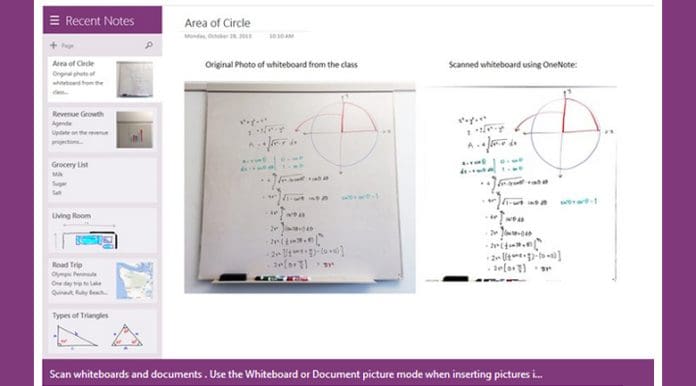
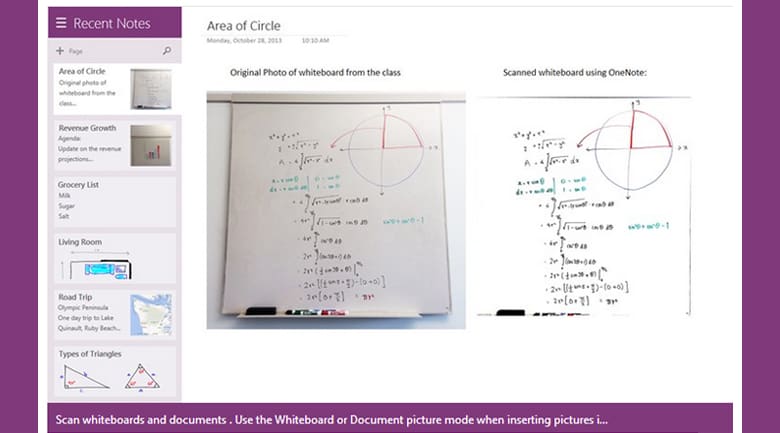
You can also take a screenshot, if you prefer. Simply use the Share Charm and select “screenshot” from the drop down box. You can also capture documents, magazines, and whiteboards with camera scan. Camera scan will automatically crop, rotate, and enhance your image so that it will look like a scanned document. To use this, select the camera in the radial menu.

Updating the “ink” feature

When you launch OneNote, you will see all the recent notes you have taken, synced to one location. The “recent notes” view shows you all your notes in order of when you last edited them, regardless of what notebook they are in. Then you can search for what you need quickly and efficiently using the updated search capabilities that use OCR (optical character recognition). Once you have found what you need, you can annotate your own notes on what you have captured.

This update improved the “ink” feature so that it feels more natural when you are writing, making annotation much easier. This is also easier in the new full screen view. On smaller devices, full screen will enable automatically, but for larger devices you will need to swipe up from the bottom or right-click the page and then select “full screen.”

With these new updates, OneNote will be even more useful for anyone using a tablet to take notes at meetings, conferences, or classrooms. It has never been easier to capture and store what you need with OneNote. If you have not already checked out the new update, it is worth a look. I especially like the new search capabilities. It makes it so much easier to find what you need without searching through each notebook for a particular file.

Jennifer Walpole, Sr. Staff Writer
Jennifer Walpole is a Senior Staff Writer at The American Genius and holds a Master's degree in English from the University of Oklahoma. She is a science fiction fanatic and enjoys writing way more than she should. She dreams of being a screenwriter and seeing her work on the big screen in Hollywood one day.
Subscribe
Notify of
wpDiscuz
0
0
What insights can you add? →x
()
x
Exit mobile version
