Tuesday, December 23, 2025

Unlock AG Pro Today

Why Now?

AG Pro gives you sharp insights, compelling stories, and weekly mind fuel without the fluff. Think of it as your brain’s secret weapon – and our way to keep doing what we do best: cutting the BS and giving you INDEPENDENT real talk that moves the needle.

Limited time offer: $29/yr (regularly $149)
✔ Full access to all stories and 20 years of analysis
✔ Long-form exclusives and sharp strategy guides
✔ Weekly curated breakdowns sent to your inbox

We accept all major credit cards.

Pro

/ once per week

Get everything, no strings.

AG-curious? Get the full-access version, just on a week-to-week basis.
• Unlimited access, no lockouts
• Full Premium archive access
• Inbox delivery + curated digests
• Stop anytime, no hoops

$
7
$
0

Get your fill of no-BS brilliance.

Pro

/ once per year

All in, all year. Zero lockouts.

The best deal - full access, your way. No timeouts, no limits, no regrets.
A year for less than a month of Hulu+
• Unlimited access to every story
• Re-read anything, anytime
• Inbox drop + curated roundups

$
29
$
0

*Most Popular

Full access, no pressure. Just power.

Free
/ limited

Useful, just not unlimited.

You’ll still get the goods - just not the goodest, freshest goods. You’ll get:
• Weekly email recaps + curation
• 24-hour access to all new content
• No archive. No re-reads

Free

Upgrade later -
we’ll be here!

Unlock AG Pro Today

Why Now?

AG Pro gives you sharp insights, compelling stories, and weekly mind fuel without the fluff. Think of it as your brain’s secret weapon – and our way to keep doing what we do best: cutting the BS and giving you INDEPENDENT real talk that moves the needle.

Limited time offer: $29/yr (regularly $149)
✔ Full access to all stories and 20 years of analysis
✔ Long-form exclusives and sharp strategy guides
✔ Weekly curated breakdowns sent to your inbox

We accept all major credit cards.

Pro

/ once per week

Get everything, no strings.

AG-curious? Get the full-access version, just on a week-to-week basis.
• Unlimited access, no lockouts
• Full Premium archive access
• Inbox delivery + curated digests
• Stop anytime, no hoops

$
7
$
0

Get your fill of no-BS brilliance.

Pro

/ once per year

All in, all year. Zero lockouts.

The best deal - full access, your way. No timeouts, no limits, no regrets.
A year for less than a month of Hulu+
• Unlimited access to every story
• Re-read anything, anytime
• Inbox drop + curated roundups

$
29
$
0

*Most Popular

Full access, no pressure. Just power.

Free
/ limited

Useful, just not unlimited.

You’ll still get the goods - just not the goodest, freshest goods. You’ll get:
• Weekly email recaps + curation
• 24-hour access to all new content
• No archive. No re-reads

Free

Upgrade later -
we’ll be here!

Your phone is keeping tabs on your location: how to opt out

Guess who’s following you now? You guessed it – Google

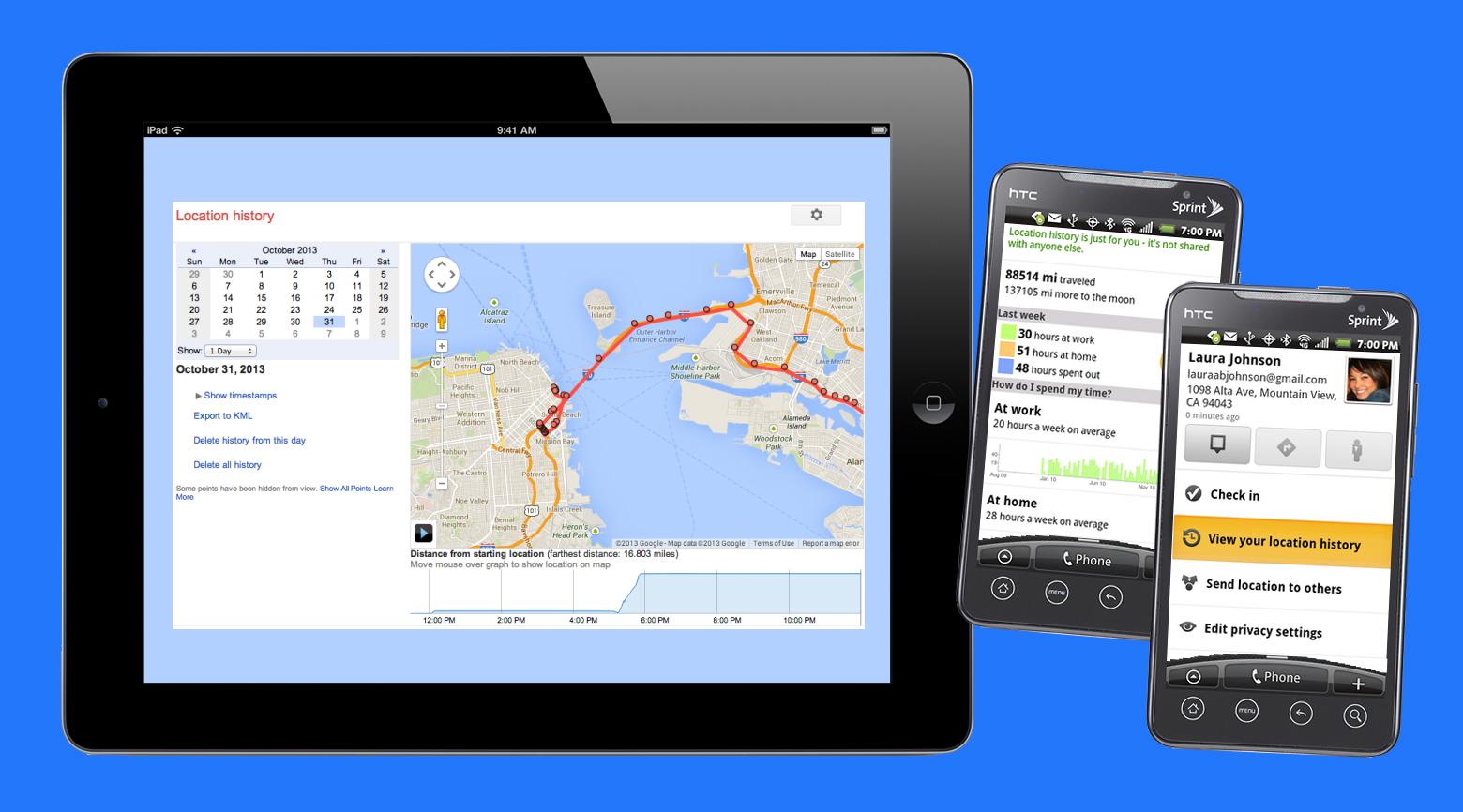
You are probably thinking, “I know my GPS keeps track of me,” but did you know it goes beyond simple GPS locations? According to TechCrunch, Google’s Location History will show you every place you visited during the day, on any day.


The tool was originally launched when Latitude was being used. Even though Latitude is no longer a part of Google’s services, the tool the keeps the data is still very much active. This is an opt-in tool. Any time you install a Google-based app on your iOS device, or set up a new Android device, you are asked to share location data; if you agree, your information is stored in a database. There is a way to opt-out however, if this sounds like too much data collecting for your liking.

If you are an Android user:

There are two separate features which use Google’s location services: location reporting and location history. Location reporting is a feature that feeds apps like Google Now, Twitter, and Foursquare your position. Without this feature your phone does not know where you are when you check in. Location history is your tracker. It keeps track of which addresses you navigate to and where “home” and “work” are located. To disable either of these features you will need to follow these steps:

  1. Open the App Drawer and navigate to “settings.”
  2. Scroll down and tap “location.” Scroll down again and tap “Google Location Settings.”
  3. You can then tap “location reporting” or “location history.”
  4. Also, you can delete your phone’s location cache by tapping “delete location history.”

You will need to repeat these steps for each Google account your have on your device.

Please note: if you disable these services, Google Maps will not work, or it will ask you every time if it can access your position. The best option, in my opinion, is to disable location history and leave location reporting alone. This way you can enjoy location services without the fear of having your every move tracked and stored. If you are wondering what happens to the database information, I will cover that too.

If you are an iOS user:

The steps here will restrict Google’s access, to get started:

  1. Open the “Settings” app and scroll down to “privacy.” Tap “location services.”
  2. Disable all location services by swiping the slider across the top, or scrolling down to disable location services for specific apps (consider
  3. Google and Google Maps your most pressing concern).
  4. Finally, select “system services” to deny location data from specific aspect so the app (“Frequent Locations” or “Near Me”).
  5. Again, please note: if you disable these features, you will get a pop-up every time you use an app that wants your location asking for permission to “read” your location.
    Once you have deleted your information from your device, you may still want to empty Google’s database of your location from the web. Accessing this site via your mobile device is the only way the delete the history in the case of iOS users. You can turn off Google’s access with the steps above, but you will need to visit the site to clear your data completely.

    Location services can be immensely useful to find something new around your current location, but if you are not a fan of your phone storing your information, the steps above should have you covered.

Jennifer Walpole, Sr. Staff Writer
Jennifer Walpole is a Senior Staff Writer at The American Genius and holds a Master's degree in English from the University of Oklahoma. She is a science fiction fanatic and enjoys writing way more than she should. She dreams of being a screenwriter and seeing her work on the big screen in Hollywood one day.

3 COMMENTS

Subscribe
Notify of
wpDiscuz
3
0
What insights can you add? →x
()
x
Exit mobile version
