You have all been told for years that you must add lots and lots of images to your sites. You’ve learned that visitors enjoy looking at pictures of houses, that blog readers are pulled in by having large images at the top of a post.
But is it possible to bring more traffic in from the search engines because of how you use images on your sites? The answer is yes. Today we’ll cover a few ways to help your site rank better using images.
Before we continue, take six minutes and watch these three Google Webmaster videos:
- Should I expect increased traffic if I optimize my images?
- Matt Cutts Discusses the Importance of alt Tags
- Does Google consider the URL of an image?
That pretty well sums up this post…oh, you want more? Fine, keep reading.
Use Descriptive File Names for Images
In video 1, Matt flat out tells us – YES OPTIMIZING IMAGES WILL INCREASE TRAFFIC. What else do I need to say to convince you?
Matt suggests using descriptive file names for your images. Don’t keep the bland,boring name your camera created, what good is a name like “dsc00234.jpg”? You should use a carefully thought out descriptive name. You shouldn’t get too carried away with long file names, but I do suggest using multiple words. Of course, keep in mind our tip from last week and use dashes to separate the words in your file name. Possibly use something like: “3576-lakeview-street-homerville-tennessee-kitchen-1.jpg”.
Use ALT Tags for Images
In Video 2, Matt reinforces something I and others have already told you – ALT tags for your images are important. However, he does tell us something new; it’s OK to use slightly longer, more descriptive text instead of just “cat”, “house” or “motorcycle.” So what does that mean for you? It means that when you take pictures of a house you are listing, you have an opportunity to really do a good job of describing the property through photos, in a way the search engines not only understand, they want. Consider putting something like this in your ALT tags: “123 brookehaven road, Jasper, Wyoming – master bedroom – MLS 123456”. Be creative in your description, use words people will be using when they search the web.
Image File URLs
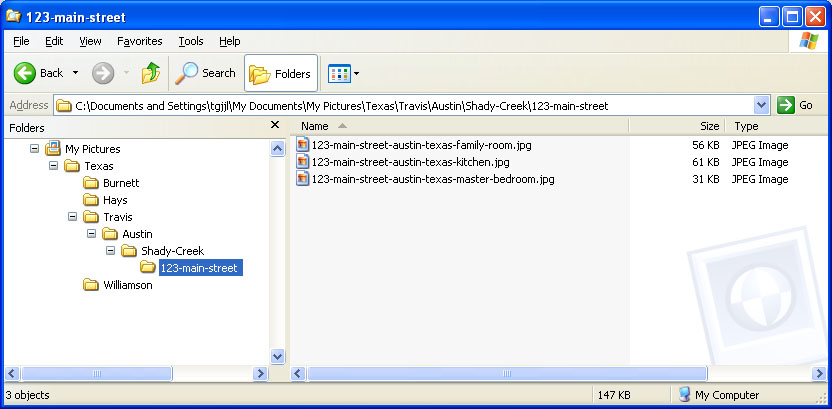
BONUS Information
How well did you listen to video 3? Go back and listen to it again, starting from about the 25 second mark, ending at about the 40 second mark. OCR and Meta-data for the images? Now we’re talking.
OCR?

Meta-data?
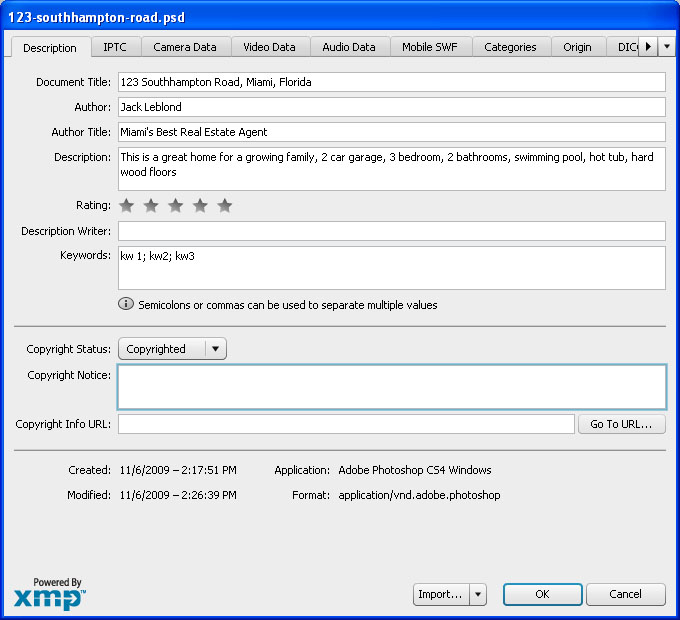
I know this was a lot of information, but I’m confidant you can manage it.
When working with images, keep the fortune cookie in mind; how it looks on the outside is important, but sometimes it’s what you can’t see that is more important.