Wednesday, December 24, 2025

Unlock AG Pro Today

Why Now?

AG Pro gives you sharp insights, compelling stories, and weekly mind fuel without the fluff. Think of it as your brain’s secret weapon – and our way to keep doing what we do best: cutting the BS and giving you INDEPENDENT real talk that moves the needle.

Limited time offer: $29/yr (regularly $149)
✔ Full access to all stories and 20 years of analysis
✔ Long-form exclusives and sharp strategy guides
✔ Weekly curated breakdowns sent to your inbox

We accept all major credit cards.

Pro

/ once per week

Get everything, no strings.

AG-curious? Get the full-access version, just on a week-to-week basis.
• Unlimited access, no lockouts
• Full Premium archive access
• Inbox delivery + curated digests
• Stop anytime, no hoops

$
7
$
0

Get your fill of no-BS brilliance.

Pro

/ once per year

All in, all year. Zero lockouts.

The best deal - full access, your way. No timeouts, no limits, no regrets.
A year for less than a month of Hulu+
• Unlimited access to every story
• Re-read anything, anytime
• Inbox drop + curated roundups

$
29
$
0

*Most Popular

Full access, no pressure. Just power.

Free
/ limited

Useful, just not unlimited.

You’ll still get the goods - just not the goodest, freshest goods. You’ll get:
• Weekly email recaps + curation
• 24-hour access to all new content
• No archive. No re-reads

Free

Upgrade later -
we’ll be here!

Unlock AG Pro Today

Why Now?

AG Pro gives you sharp insights, compelling stories, and weekly mind fuel without the fluff. Think of it as your brain’s secret weapon – and our way to keep doing what we do best: cutting the BS and giving you INDEPENDENT real talk that moves the needle.

Limited time offer: $29/yr (regularly $149)
✔ Full access to all stories and 20 years of analysis
✔ Long-form exclusives and sharp strategy guides
✔ Weekly curated breakdowns sent to your inbox

We accept all major credit cards.

Pro

/ once per week

Get everything, no strings.

AG-curious? Get the full-access version, just on a week-to-week basis.
• Unlimited access, no lockouts
• Full Premium archive access
• Inbox delivery + curated digests
• Stop anytime, no hoops

$
7
$
0

Get your fill of no-BS brilliance.

Pro

/ once per year

All in, all year. Zero lockouts.

The best deal - full access, your way. No timeouts, no limits, no regrets.
A year for less than a month of Hulu+
• Unlimited access to every story
• Re-read anything, anytime
• Inbox drop + curated roundups

$
29
$
0

*Most Popular

Full access, no pressure. Just power.

Free
/ limited

Useful, just not unlimited.

You’ll still get the goods - just not the goodest, freshest goods. You’ll get:
• Weekly email recaps + curation
• 24-hour access to all new content
• No archive. No re-reads

Free

Upgrade later -
we’ll be here!

Simple method to customize a QR code

Custom QR codes

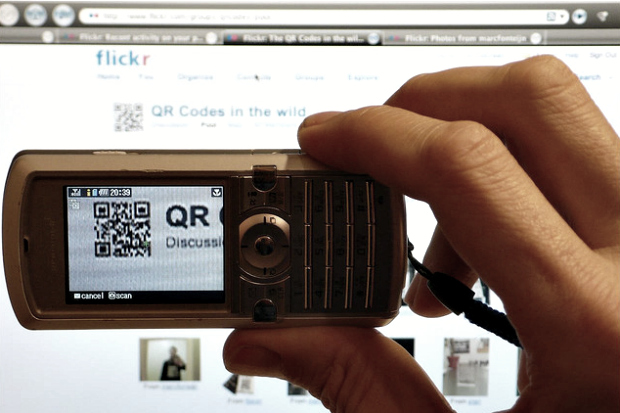
We have been reporting on QR codes in marketing for years, and today share with you one method of customizing your QR codes. Rather than simply use a free QR code generator that offers the standard black and white checkerboard-like pattern, you can add color or even words to a QR code that works just like a normal QR code.

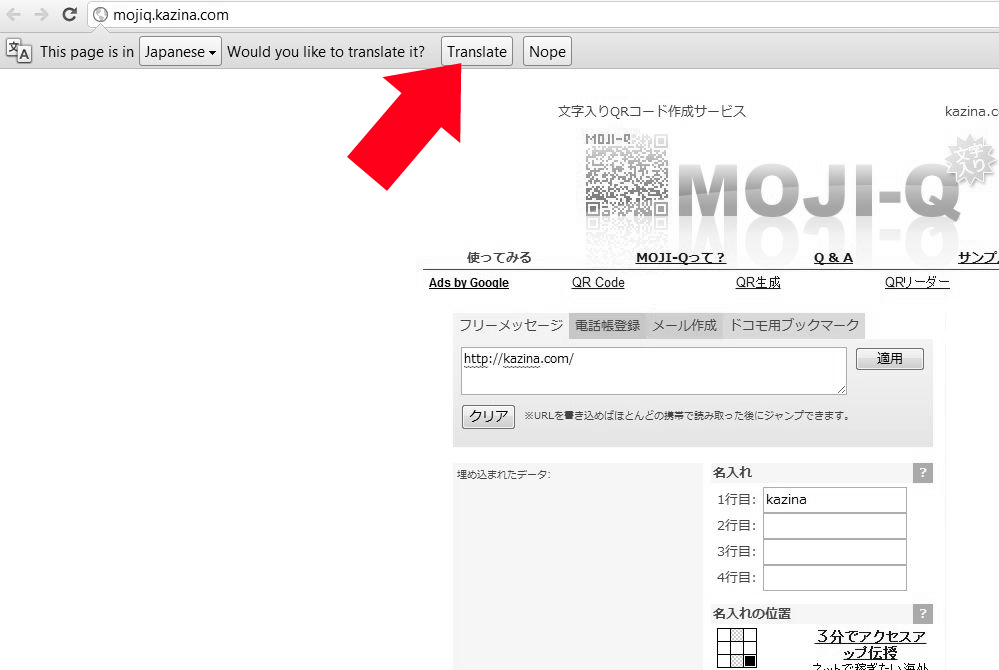
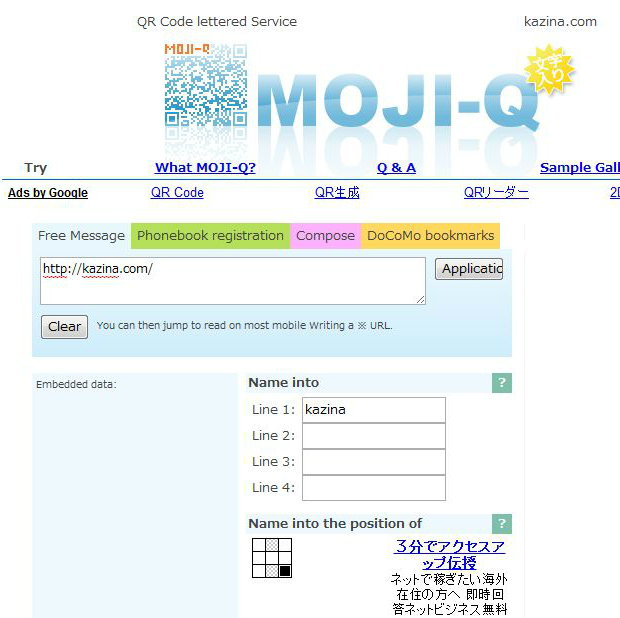
One simple way to create a custom QR code is to visit MOJI-Q 2.0 which works best in Google Chrome as it offers to translate the page from Japanese into English (although it is not too difficult to figure out, even in Japanese). How to get started:

  1. In the first large white box, type in the URL you want the QR code to point to.
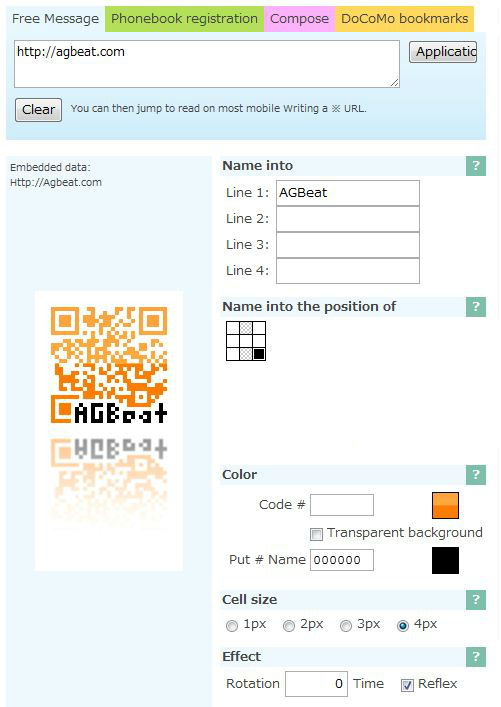
  2. Type in the words you wish to appear in your custom QR code. It allows for 4 lines but if fewer words are used, the larger the font is and the easier it is for consumers to understand what it says.
  3. Next, find the tiny 9-square checkerboard and click on where you would like the words you typed in the previous steps to appear. The default is the bottom right position.
  4. Select what color you want the code to be and then what color the text should be. Some have special effects and some are flat, but both allow for HEX codes which means you can add your brand’s exact color.
  5. Choose the cell size – we recommend the largest possible as you may reproduce the code in a variety of formats.
  6. Choose the rotation which could change the code from a standard code to one at an angle. We recommend not altering this.

These codes can be used on signs, on business cards, on stickers or magnets for your car, for the window of your business, flyers or even mailers. Because these are customizable and you can alter the color and add text, you have a lot of room to get creative.
Marti Trewe
Marti Trewe reports on business and technology news, chasing his passion for helping entrepreneurs and small businesses to stay well informed in the fast paced 140-character world. Marti rarely sleeps and thrives on reader news tips, especially about startups and big moves in leadership.

26 COMMENTS

Subscribe
Notify of
wpDiscuz
26
0
What insights can you add? →x
()
x
Exit mobile version
