Monday, February 23, 2026

Unlock AG Pro Today

Why Now?

AG Pro gives you sharp insights, compelling stories, and weekly mind fuel without the fluff. Think of it as your brain’s secret weapon – and our way to keep doing what we do best: cutting the BS and giving you INDEPENDENT real talk that moves the needle.

Limited time offer: $29/yr (regularly $149)
✔ Full access to all stories and 20 years of analysis
✔ Long-form exclusives and sharp strategy guides
✔ Weekly curated breakdowns sent to your inbox

We accept all major credit cards.

Pro

/ once per week

Get everything, no strings.

AG-curious? Get the full-access version, just on a week-to-week basis.
• Unlimited access, no lockouts
• Full Premium archive access
• Inbox delivery + curated digests
• Stop anytime, no hoops

$
7
$
0

Get your fill of no-BS brilliance.

Pro

/ once per year

All in, all year. Zero lockouts.

The best deal - full access, your way. No timeouts, no limits, no regrets.
A year for less than a month of Hulu+
• Unlimited access to every story
• Re-read anything, anytime
• Inbox drop + curated roundups

$
29
$
0

*Most Popular

Full access, no pressure. Just power.

Free
/ limited

Useful, just not unlimited.

You’ll still get the goods - just not the goodest, freshest goods. You’ll get:
• Weekly email recaps + curation
• 24-hour access to all new content
• No archive. No re-reads

Free

Upgrade later -
we’ll be here!

Unlock AG Pro Today

Why Now?

AG Pro gives you sharp insights, compelling stories, and weekly mind fuel without the fluff. Think of it as your brain’s secret weapon – and our way to keep doing what we do best: cutting the BS and giving you INDEPENDENT real talk that moves the needle.

Limited time offer: $29/yr (regularly $149)
✔ Full access to all stories and 20 years of analysis
✔ Long-form exclusives and sharp strategy guides
✔ Weekly curated breakdowns sent to your inbox

We accept all major credit cards.

Pro

/ once per week

Get everything, no strings.

AG-curious? Get the full-access version, just on a week-to-week basis.
• Unlimited access, no lockouts
• Full Premium archive access
• Inbox delivery + curated digests
• Stop anytime, no hoops

$
7
$
0

Get your fill of no-BS brilliance.

Pro

/ once per year

All in, all year. Zero lockouts.

The best deal - full access, your way. No timeouts, no limits, no regrets.
A year for less than a month of Hulu+
• Unlimited access to every story
• Re-read anything, anytime
• Inbox drop + curated roundups

$
29
$
0

*Most Popular

Full access, no pressure. Just power.

Free
/ limited

Useful, just not unlimited.

You’ll still get the goods - just not the goodest, freshest goods. You’ll get:
• Weekly email recaps + curation
• 24-hour access to all new content
• No archive. No re-reads

Free

Upgrade later -
we’ll be here!

TouchCast: a television studio in your iPad

TouchCast works by integrating your iPad camera with an array of widgets to create personalized, interactive videos; these widgets range from Facebook and Twitter streams, to photos, lists, polls, ratings, and so many more.

Once you have signed up with TouchCast and you have taken a look at all the widgets, you can decide which ones you would like to use in your video. You can pre-select and set up the widgets, called vApps, you want to use for production and they will be added to a timeline at the bottom. This enables you to quickly access them during recording.

When you select a vApp, a blue frame appears around it which enables you to move and resize it to suit your needs and insure perfect placement. The editing frame will not show in your final production, it is merely another helpful tool. This is important because when you place your vApp in your video, it will become interactive. Meaning, as viewers watch or listen to your recording, they will be able to tap on and enlarge a web page, view a social network feed, or respond to a survey or poll, within the recording, so it needs to be placed in a place that looks and feels right to you for that type of interaction.

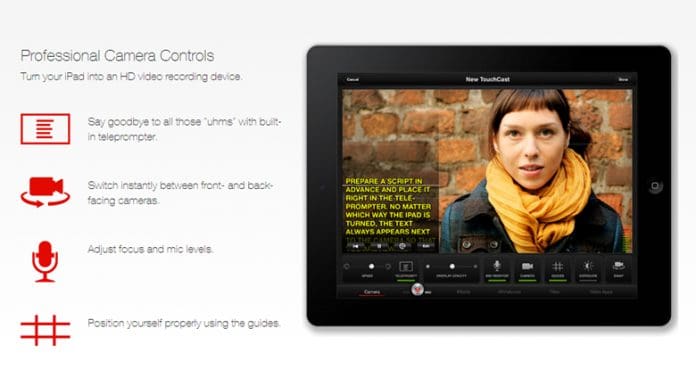
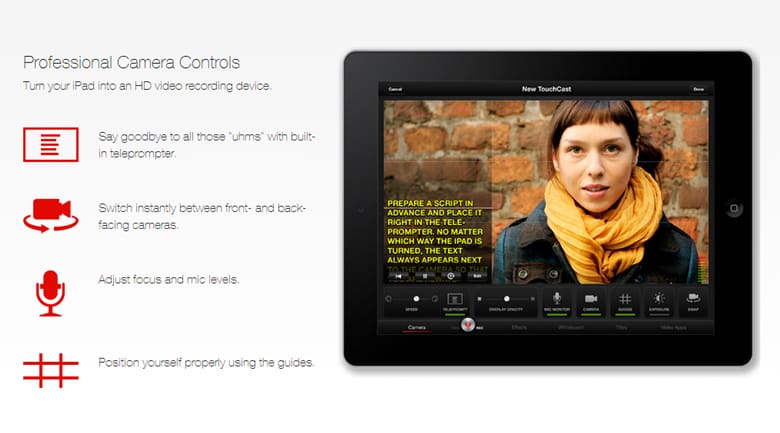
To use TouchCast effectively, you will probably need to plan out what you want to say so that you can select the appropriate vApp. TouchCast offers production tools much like a professional studio would use. There is a teleprompter feature with adjustable speed (text will not show in final production), a camera swap button, so you can switch from front-facing lens to rear, if you are interviewing someone, or want to show a demo of your product or item without turning the iPad (there is also a one second dissolve feature you can use here as a transition if you need it), and TouchCast also offers a whiteboard with a plethora of tools for editing. You also get several filters, much like the ones used on Instagram, to add different effects to your photos.

You can save your project as you go and freely access it anytime. It will even save your vApps, so you do not have to re-select and reload them in to the toolbar. When you are done creating your TouchCast video, it is hosted online on your own TouchCast channel and viewable anyone using Chrome or Safari. From within the app, you can share these TouchCast videos via Facebook, Twitter and email, as well. You can also upload it to YouTube, but it will be non-interactive.

TouchCast is currently available in the iTunes store as a free download. And the site says it will soon be available for desktop download.

Jennifer Walpole, Sr. Staff Writer
Jennifer Walpole is a Senior Staff Writer at The American Genius and holds a Master's degree in English from the University of Oklahoma. She is a science fiction fanatic and enjoys writing way more than she should. She dreams of being a screenwriter and seeing her work on the big screen in Hollywood one day.

1 COMMENT

Subscribe
Notify of
wpDiscuz
1
0
What insights can you add? →x
()
x
Exit mobile version
