Thursday, January 15, 2026

Unlock AG Pro Today

Why Now?

AG Pro gives you sharp insights, compelling stories, and weekly mind fuel without the fluff. Think of it as your brain’s secret weapon – and our way to keep doing what we do best: cutting the BS and giving you INDEPENDENT real talk that moves the needle.

Limited time offer: $29/yr (regularly $149)
✔ Full access to all stories and 20 years of analysis
✔ Long-form exclusives and sharp strategy guides
✔ Weekly curated breakdowns sent to your inbox

We accept all major credit cards.

Pro

/ once per week

Get everything, no strings.

AG-curious? Get the full-access version, just on a week-to-week basis.
• Unlimited access, no lockouts
• Full Premium archive access
• Inbox delivery + curated digests
• Stop anytime, no hoops

$
7
$
0

Get your fill of no-BS brilliance.

Pro

/ once per year

All in, all year. Zero lockouts.

The best deal - full access, your way. No timeouts, no limits, no regrets.
A year for less than a month of Hulu+
• Unlimited access to every story
• Re-read anything, anytime
• Inbox drop + curated roundups

$
29
$
0

*Most Popular

Full access, no pressure. Just power.

Free
/ limited

Useful, just not unlimited.

You’ll still get the goods - just not the goodest, freshest goods. You’ll get:
• Weekly email recaps + curation
• 24-hour access to all new content
• No archive. No re-reads

Free

Upgrade later -
we’ll be here!

Unlock AG Pro Today

Why Now?

AG Pro gives you sharp insights, compelling stories, and weekly mind fuel without the fluff. Think of it as your brain’s secret weapon – and our way to keep doing what we do best: cutting the BS and giving you INDEPENDENT real talk that moves the needle.

Limited time offer: $29/yr (regularly $149)
✔ Full access to all stories and 20 years of analysis
✔ Long-form exclusives and sharp strategy guides
✔ Weekly curated breakdowns sent to your inbox

We accept all major credit cards.

Pro

/ once per week

Get everything, no strings.

AG-curious? Get the full-access version, just on a week-to-week basis.
• Unlimited access, no lockouts
• Full Premium archive access
• Inbox delivery + curated digests
• Stop anytime, no hoops

$
7
$
0

Get your fill of no-BS brilliance.

Pro

/ once per year

All in, all year. Zero lockouts.

The best deal - full access, your way. No timeouts, no limits, no regrets.
A year for less than a month of Hulu+
• Unlimited access to every story
• Re-read anything, anytime
• Inbox drop + curated roundups

$
29
$
0

*Most Popular

Full access, no pressure. Just power.

Free
/ limited

Useful, just not unlimited.

You’ll still get the goods - just not the goodest, freshest goods. You’ll get:
• Weekly email recaps + curation
• 24-hour access to all new content
• No archive. No re-reads

Free

Upgrade later -
we’ll be here!

Using Outlook to keep in touch with your SOI (Sphere of Influence)

I ask students all the time how they keep in touch with their past customers and sphere. What I hear is that many are using all sorts of tools to do all sorts of things, but not many are organized to communicate with their sphere on a regular basis.

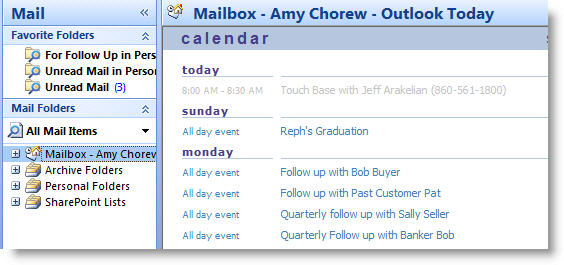
Consider using Microsoft Outlook to do this. Every day I “touch or contact” five of the clients in my sphere. How do I know who to contact? I have set them up as recurring appointments in Outlook. Before I start my day I open Outlook and look at the days activities and pick 5 people to either call, email or contact on Facebook.
I have gone through my top 100 and set up an appointment to contact them four times a year. Because I contact 5 people a day, five days a week, I reach over 1250 people every year and it keeps my business vibrant.  Outlooks reminds me to contact them, but I can choose how to do it. It may be a phone call, a personal email or maybe a touch base on their Facebook page.

Millions of people use Outlook every day to get things done. And most of us use only a fraction of Outlooks’ power.

Because Outlook is part of Microsoft’s suite of products you can copy a chart from an excel spreadsheet and paste into an email. You can also keep a list of mailing and email addresses in Outlook and use them for a email merge with a ENewsletter you created in Word.
Outlook is divided into modules to help you perform certain job functions. The most important for us as sales people are:
•    Calendar
•    Email
•    Tasks
Using Outlook with its email and contact management system can work for most sales associates. It is best for sorting leads and handling the more active leads. If you want step by step instructions on the following three Outlook tools, please email me directly at mailto:amy@amychorew.com/
1.    Create Folders and Rules – Organize emails into folders
2.    Create Contacts from emails that people send so you can synch contacts with your handheld
3.    Set up recurring appointments to stay in touch
It’s easy to overlook the fact that the Contacts module is a database, but Outlook provides a surprisingly capable system for managing names and addresses. Contacts provides different views of your data, including table and card formats. You can define your own views and add your own fields. There are good searching facilities and it also provides a set of categories, again user definable, which can be used to tag records for retrieval. So, providing your needs are straightforward, it is well worth looking at Outlook as a way of managing your names and addresses.
Office 2003 (and now 2007) provide reasonably good integration with Word. It is possible to go into Outlook select a set of records, press mail merge or email merge and move seamlessly into Word to complete the process of producing standard letters, mailing labels or emails.
Outlook won’t be enough for everyone. Its reporting facilities are quite limited and so if you want to do more elaborate printouts you may have to look elsewhere.

Amy Chorewhttps://www.thetechbyte.com
Amy is a national technology speaker who can inspire, train and help people implement technology strategies into their business. To find out about her training, coaching or webinars visit her website at www.amychorew.com

8 COMMENTS

Subscribe
Notify of
wpDiscuz
8
0
What insights can you add? →x
()
x
Exit mobile version
