




Swipes: simple, beautiful, minimalist
Swipes might be considered a free version of Clear, and, as the name suggests, it is gesture enabled, allowing you to swipe when you have completed a task. Simple.
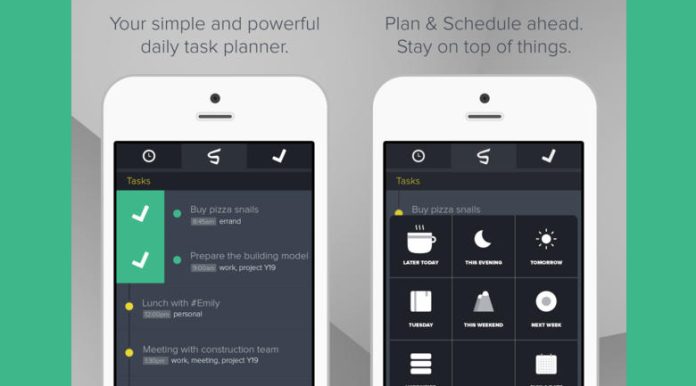
After downloading the Swipe app, signup is easy. You can sign up via Facebook or register with your email address. Afterwards you will be taken the menu screen. The first things you will notice are a huge yellow “+” sign and a bulleted list of items. The list is actually a tutorial inviting you to “tap me,” “swipe right,” and “double-tap.” Completing each of these tasks will give you the basic understand of how Swipes works. When you have completed a task on your list, you will swipe right on it; it will then turn green and disappear from your “scheduled” list to your “completed” list.
If you swipe left over a task, it will turn red and you can access all the scheduling options. There are seven options available under scheduling: later today, this evening, tomorrow, the next day, this weekend, next weekend, unspecified, and pick a date. You will also be reminded about your upcoming tasks. If you change your mind about when you want to be reminded, simply double-tap the to-do and you can access your options.
When you double-tap, you will see three options: remind me, set tags, and add notes.
You can also tap and hold to drag a to-do up and down (to reorganize your list), and tap then pull down to search and filter. When you pull down, a search box will appear at the top and you can search for all of the tags you have used. At any time you can single tap to delete or add tags. This is also how you can create a sub-list. By utilizing the tags, you can create a list within a list, simply by tagging a to-do with the same keywords. Then, when you need it later, you can search by these tags and those to-dos will pop up.
Design allows ease of use
The minimalist design allows you to easily switch between the three top tabs: schedule, swipe, and completed, instantly letting your see what needs to be, what you have completed, and what needs to be scheduled. This is especially useful if you have several clients to meet in a week. You can tag each task with the individual client’s name and then search for what needs to be done regarding that client, as well as, the week as a whole. While you may already do this in your preferred calendar app, Swipes is a good option for last minute thoughts and schedule changes, as it loads very fast and does not have a lot of extra features getting in the way. It is just the to-do basics. And being able to swipe things off your list, actually makes it fun to complete tasks.
The only down side to Swipes, versus the previously mentioned Clear, is that Swipes does not really have a way to tweak any of the settings, And it is not quite as aesthetically “pretty,” but since Swipes is free and they both give you the same end-result, it is easy to overlook these minor details, in my opinion.
After signing up for Swipes, I received an email letting me know that they plan on offering synchronization and a web app, as well as, new features including priorization of your to-dos, location-based reminders, and the ability to see which to-do’s you frequently use/complete. With these added features is could really give Clear a run for to-do app.
Swipes is free to download from the App Store and with hundred of to-do apps in the App Store, Swipes is worth a look if you are still searching for one that works for you.


