Sunday, December 21, 2025

Unlock AG Pro Today

Why Now?

AG Pro gives you sharp insights, compelling stories, and weekly mind fuel without the fluff. Think of it as your brain’s secret weapon – and our way to keep doing what we do best: cutting the BS and giving you INDEPENDENT real talk that moves the needle.

Limited time offer: $29/yr (regularly $149)
✔ Full access to all stories and 20 years of analysis
✔ Long-form exclusives and sharp strategy guides
✔ Weekly curated breakdowns sent to your inbox

We accept all major credit cards.

Pro

/ once per week

Get everything, no strings.

AG-curious? Get the full-access version, just on a week-to-week basis.
• Unlimited access, no lockouts
• Full Premium archive access
• Inbox delivery + curated digests
• Stop anytime, no hoops

$
7
$
0

Get your fill of no-BS brilliance.

Pro

/ once per year

All in, all year. Zero lockouts.

The best deal - full access, your way. No timeouts, no limits, no regrets.
A year for less than a month of Hulu+
• Unlimited access to every story
• Re-read anything, anytime
• Inbox drop + curated roundups

$
29
$
0

*Most Popular

Full access, no pressure. Just power.

Free
/ limited

Useful, just not unlimited.

You’ll still get the goods - just not the goodest, freshest goods. You’ll get:
• Weekly email recaps + curation
• 24-hour access to all new content
• No archive. No re-reads

Free

Upgrade later -
we’ll be here!

Unlock AG Pro Today

Why Now?

AG Pro gives you sharp insights, compelling stories, and weekly mind fuel without the fluff. Think of it as your brain’s secret weapon – and our way to keep doing what we do best: cutting the BS and giving you INDEPENDENT real talk that moves the needle.

Limited time offer: $29/yr (regularly $149)
✔ Full access to all stories and 20 years of analysis
✔ Long-form exclusives and sharp strategy guides
✔ Weekly curated breakdowns sent to your inbox

We accept all major credit cards.

Pro

/ once per week

Get everything, no strings.

AG-curious? Get the full-access version, just on a week-to-week basis.
• Unlimited access, no lockouts
• Full Premium archive access
• Inbox delivery + curated digests
• Stop anytime, no hoops

$
7
$
0

Get your fill of no-BS brilliance.

Pro

/ once per year

All in, all year. Zero lockouts.

The best deal - full access, your way. No timeouts, no limits, no regrets.
A year for less than a month of Hulu+
• Unlimited access to every story
• Re-read anything, anytime
• Inbox drop + curated roundups

$
29
$
0

*Most Popular

Full access, no pressure. Just power.

Free
/ limited

Useful, just not unlimited.

You’ll still get the goods - just not the goodest, freshest goods. You’ll get:
• Weekly email recaps + curation
• 24-hour access to all new content
• No archive. No re-reads

Free

Upgrade later -
we’ll be here!

Wirelessly Bump photos from smartphone to computer

Solving a major pain point of photo taking

One of the most annoyingly tedious tasks is transferring photos from your phone to your computer. If you’re like the majority out there, you’ve probably emailed yourself pictures, just so you can access them or share them with clients, friends, or family members. Or maybe you’ve synced your phone with your computer with the use of a required cable. Either way, it doesn’t have to be that tedious, not anymore. Bump made sure of that.

Bump has been around for a few years, as you may already know. This service allowed users to “bump” their phones together and share photos directly with intended recipients. While this has been a very popular service, with over 600 million photos shared in two years, Bump has taken it one step further. Now you can bump your phone with your computer. Doing so will allow you to choose which pictures from your phone you want access to on your computer, and not a single cord or cable is required. It all works through your everyday web browser.

Quick setup steps

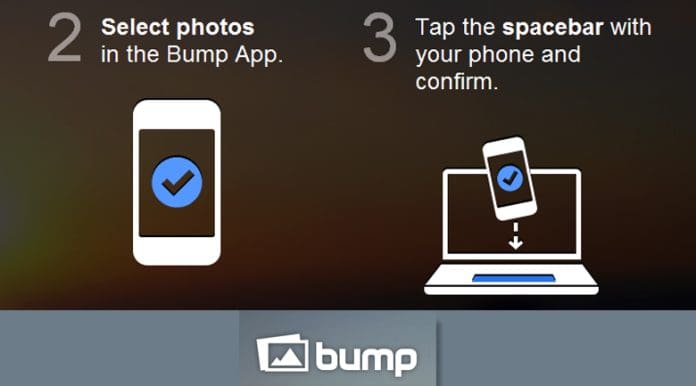
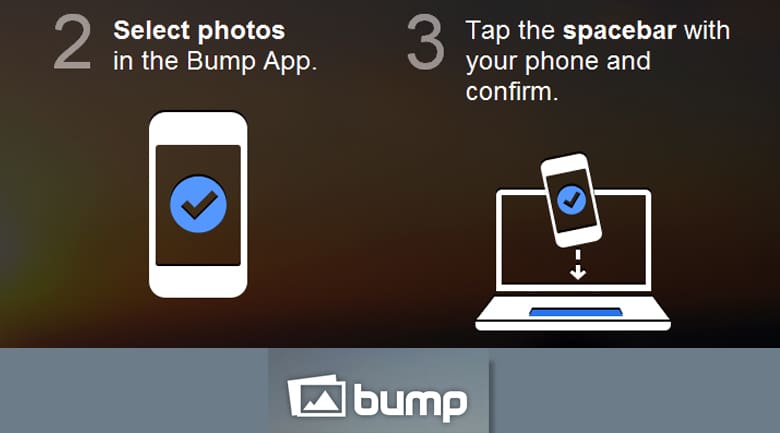
All you have to do is download the Bump app and then sign in to the website and you’re officially connected and ready to bump! And a bonus is that you don’t even have to install software to your computer. Once you’ve chosen which photos you want to keep on your computer, you can choose to “save them to your hard drive or get a short link to share with friends on Facebook, Twitter, email, or IM.” And to officially bump any photos, all you have to hit is the spacebar. That’s it! Or, if you don’t want to share right away or you want to keep the photos with Bump, they also host an unlimited number of your photos, for free.

While the personal use of Bump is obvious, your professional efforts can greatly benefit from it, too. If you’re a real estate agent, for instance, you can take quick photos on your phone when you’re in a hurry and then email or message them to clients and coworkers. Imagine how much time you’ll save just by never waiting for your phone and computer to sync ever again. And that’s just one way to use Bump professionally.

Bump claims their service is magical. Whether you agree or not, one thing is for certain – Bump has provided a relevant, time-efficient, and useful service for both the personal and professional markets. It makes taking pictures on a whim and sharing through varying online outlets possible, convenient, and enjoyable.

Charlene Jimenezhttps://agbeat.com/author/charlene
The American Genius Staff Writer: Charlene Jimenez earned her Master's Degree in Arts and Culture with a Creative Writing concentration from the University of Denver after earning her Bachelor's Degree in English from Brigham Young University in Idaho. Jimenez's column is dedicated to business and technology tips, trends and best practices for entrepreneurs and small business professionals.

5 COMMENTS

Subscribe
Notify of
wpDiscuz
5
0
What insights can you add? →x
()
x
Exit mobile version
