
Monday, December 22, 2025

Unlock AG Pro Today

Why Now?

AG Pro gives you sharp insights, compelling stories, and weekly mind fuel without the fluff. Think of it as your brain’s secret weapon – and our way to keep doing what we do best: cutting the BS and giving you INDEPENDENT real talk that moves the needle.

Limited time offer: $29/yr (regularly $149)
✔ Full access to all stories and 20 years of analysis
✔ Long-form exclusives and sharp strategy guides
✔ Weekly curated breakdowns sent to your inbox

We accept all major credit cards.

Pro

/ once per week

Get everything, no strings.

AG-curious? Get the full-access version, just on a week-to-week basis.
• Unlimited access, no lockouts
• Full Premium archive access
• Inbox delivery + curated digests
• Stop anytime, no hoops

$
7
$
0

Get your fill of no-BS brilliance.

Pro

/ once per year

All in, all year. Zero lockouts.

The best deal - full access, your way. No timeouts, no limits, no regrets.
A year for less than a month of Hulu+
• Unlimited access to every story
• Re-read anything, anytime
• Inbox drop + curated roundups

$
29
$
0

*Most Popular

Full access, no pressure. Just power.

Free
/ limited

Useful, just not unlimited.

You’ll still get the goods - just not the goodest, freshest goods. You’ll get:
• Weekly email recaps + curation
• 24-hour access to all new content
• No archive. No re-reads

Free

Upgrade later -
we’ll be here!

Unlock AG Pro Today

Why Now?

AG Pro gives you sharp insights, compelling stories, and weekly mind fuel without the fluff. Think of it as your brain’s secret weapon – and our way to keep doing what we do best: cutting the BS and giving you INDEPENDENT real talk that moves the needle.

Limited time offer: $29/yr (regularly $149)
✔ Full access to all stories and 20 years of analysis
✔ Long-form exclusives and sharp strategy guides
✔ Weekly curated breakdowns sent to your inbox

We accept all major credit cards.

Pro

/ once per week

Get everything, no strings.

AG-curious? Get the full-access version, just on a week-to-week basis.
• Unlimited access, no lockouts
• Full Premium archive access
• Inbox delivery + curated digests
• Stop anytime, no hoops

$
7
$
0

Get your fill of no-BS brilliance.

Pro

/ once per year

All in, all year. Zero lockouts.

The best deal - full access, your way. No timeouts, no limits, no regrets.
A year for less than a month of Hulu+
• Unlimited access to every story
• Re-read anything, anytime
• Inbox drop + curated roundups

$
29
$
0

*Most Popular

Full access, no pressure. Just power.

Free
/ limited

Useful, just not unlimited.

You’ll still get the goods - just not the goodest, freshest goods. You’ll get:
• Weekly email recaps + curation
• 24-hour access to all new content
• No archive. No re-reads

Free

Upgrade later -
we’ll be here!

WordPress Tutorial – Installing a Simple Plugin

So you want to Shake Up your WordPress Plugins?


Let’s rock!

I’m assuming here that you have a hosting account and have your domain set up, and you’re logged in (if not read this first).  I’m navigating here to my control panel, and then to ‘file manager’ and going directly to the root directory of my website where I have WordPress installed as shown below.


From here I want to navigate to the ‘wp-content’ folder in my root domain where WordPress is installed and then click on Plugins.  So now I have my file manager open to mydomain/wp-content/plugins/.
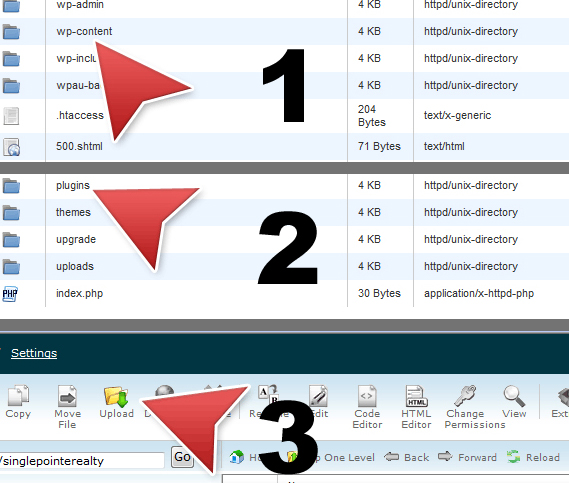


I’ve already downloaded the WordPress Plugin and read the install or readme files of the plugin I want to use and have it still zipped on my desktop so that I can navigate to it easially from the file manager.

Now, I will simply upload the plugin into my plugins folder.


Once you see that the upload is complete, close the upload window and get it out of your way.

Back in your file manager, you should see a small brown box with the name of your plugin.  The brown box indicates a zipped file, so we need to right click and extract it.


Once extracted, you should see a blue folder icon appear- this is your new plugin.


In your browser, open a new tab and log into your WP-Admin panel.  Once here you’ll want to navigate to your your plugins folder.  Scroll down and locate the plugin, (they’re typically in alphabetical order). 


Go ahead and activate the plugin. 


You should see at the top of the screen a message indicating the plugin has been activated without error. 
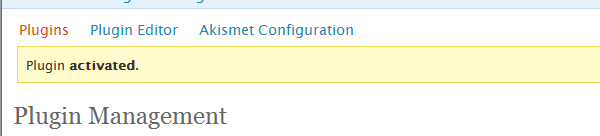


If you do recieve an error, simply retrace your steps using the Readme file enclosed in the download.  If you have executed this to the letter, and still have an error, you’ll need to go to the plugin home for support.  I’ve also found it very useful to spend a little time googling about the plugin in general to see what sorts of other issues folks have had and if there is a fix for my issue.  Nine out of Ten times I find the error was my own in missing a simple step in the instruction.  The most common error is not reading the README to learn of other plugins that partner with the plugin I’m attempting to use.

Simply navigate to Options and configure your new WordPress Plugin!

Want to request a WordPress Tutorial, hit the contact button and make a suggestion!

Ben Rosales, Founder & Publisherhttps://theamericangenius.com
Ben Rosales is the Founder and CEO of The American Genius (AG), national news network. Before AG, he founded one of the first digital media strategy firms in the nation has received the Statesman Texas Social Media Award and is an Inman Innovator Award winner. He has consulted for numerous startups (both early- and late-stage), and is well known for organizing the digital community through popular offline events. He does not venture into the spotlight often, rather he believes his biggest accomplishments are the talent he recruits and develops, so he gives all credit to those he's empowered.

6 COMMENTS

Subscribe
Notify of
wpDiscuz
6
0
What insights can you add? →x
()
x
Exit mobile version
