


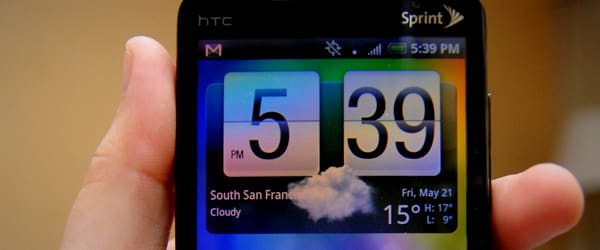

Stand out!
We get a lot of questions about our HTC EVO 4G wallpapers because we’ve all taken the extra step to customize our wallpaper. Last year, we reported on simple and free ways to save your HTC EVO battery life and one lesser known way to save battery life is to have a black or dark wallpaper.
Your smartphone is like a series of tiny light bulbs on a dimmer- white backgrounds require all bulbs to be on and black backgrounds require them at minimum dimness. The dimmer the light, the less battery (or watts in the light bulb scenario) they require. Beyond that, custom wallpapers are fun. You can use the following tutorial in a variety of ways, even turning your company logo into a black pattern with these steps.
Step one: find your shot

Go to Flickr.com or Images.Google.com to search for images. You can find one that is already dark (“black texture” as seen above) or we’ll show you below how to make it dark. Searching for “texture” is helpful.
Don’t worry about creative commons rights as you are not publishing your new wallpaper anywhere, just using it on your phone (it’s akin to printing a web image and putting it in your wallet).
Select your image, then copy the URL.
Step two: open Picnik

Go to Picnik.com/app, you don’t even need an account to use this photo editor. Click the “Library” tab, and select “Get from Website.”
This is where you will paste in your URL and click the “Open!” button.
Step three: resize

Next, it will open the image in the “Edit” tab. Click the “resize” button and keep the “keep proportions” button selected unless warping doesn’t matter. The size for all EVO and Nexus One wallpapers is 960 x 800 pixels which is what you’re aiming for.
On the image above, we told it to be 960 wide, but it was smaller than 800 tall, so we had to tell it to be 800 tall and move on to the next step…
Step four: crop

Click the “crop” button while still in the “Edit” tab. You’ve adjusted the size but you just need to crop off a bit, so drag the markers until the numbers above say 960 first and 800 second.
Step five: turn black & white
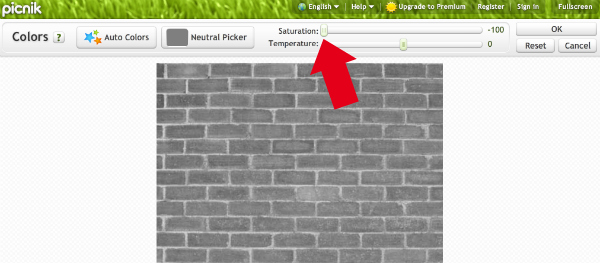
Click the “colors” button and take the saturation all the way to zero, making it completely black and white.
Step six: darken
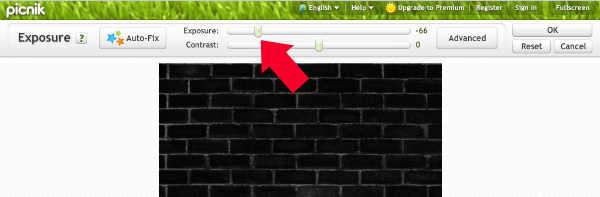
Click the “exposure” button and take the exposure down as far as you can while keeping the image or texture still intelligible. Play with the contrast too if you wish, but remember that if your texture or image has white in it, a white background contrasted with black can make your app icons difficult to see which is why making it as dark as possible is ideal.
Step seven: save

Click the “Save & Share” tab on the top right, select a 10 compression quality on the slider and click save.
Click here to see a sample of a finished product.
Step eight: get the image to your phone
- Turn on your HTC EVO or Nexus One and open a browser.
- Enter the URL of your edited image (hint: upload to Flickr or your own website, get the URL and shorten it with bit.ly. Trust us, it’s necessary).
- If you want to use the sample we created for testing this step before you make your own, in your phone browser, type https://agentgeni.us/wall (see, a shortened or easy to remember URL allows you to manually type it in if you want, simplifying this step).
- When you see the large image, hold your finger down on the image until a menu pops up (then you can stop pushing down with your finger).
- Select “set as wallpaper” and you’re done!
Show us what you come up with!



