


I’m burned out well and truly on all these RSS feeds I have. I seriously just no longer have time or the energy to look at a bazillion blog posts everyday. I have 169 feeds I follow, if I blink and miss a day it seems like I wake up to 400+ posts. Ugh.
Solution:
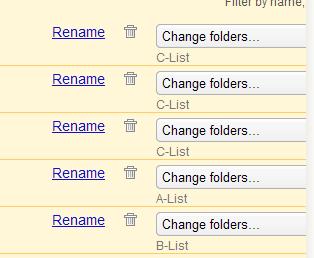 I use Google Reader, so click on Manage Subscriptions. Then click on “Change Folder” and then select the “New Folder” option.
I then named the new folders “A, B, C, D -List”.
Once you name a new folder, the name appears in the pull down menu for “Change Folder” options.
Re-folderize the whole slew of RSS feeds as A, B, C or D. Delete the other couple of folders I had. Leaving me with…
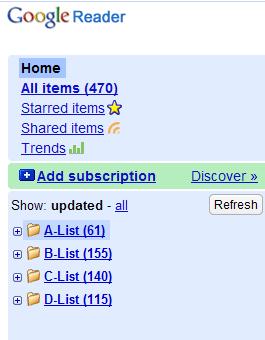
Which is a whole lot more manageable to look at.
I’ll read my the A-List blogs first, then the B’s then C’s and if I can be bothered the D’s.
Easy to select an entire list and mark it all as read and move on with my day without feeling I missed something important.
And a note to the D-List peeps, you’re also on removal notice.
And NO I won’t show who is A B or C-Listers. It’s just my preferences here. 🙂
Enjoy!
