


 Welcome back, hope you are finding this SEO tips series helpful. A few weeks ago we discussed how to properly link to your site and the documents in it. Today, we’ll learn how to discover what other sites link to you, what pages they link to, and what words they use to do it.
You may recall from my SEO Ranking Factors article that the item believed to have the most positive affect on your search engine rankings was the anchor text used in links to your pages. If you are able to influence that text, you have a better chance of improving your rankings. But, before you can influence it, you have to know that the links exist.
There are many tools that let you search for sites that link to you. Some are free, others you have to pay for. As should be expected, the ones you pay for offer a few additional features, however for the purposes of this article, most of the free ones will work just fine.
Backlinkwatch.com is a free tool for identifying up to 1,000 of your incoming links. It will show you the URL of the site that links to you, the text (or image) that is used in the link, the PageRank (if available) of the page, how many outbound links the page has and if the link is “nofollow.”
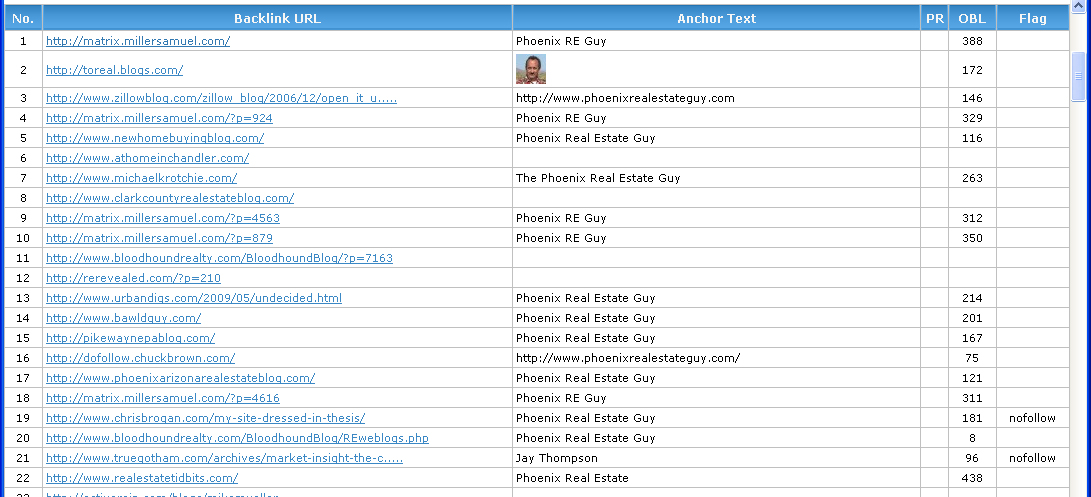
Below is a sample of the results from Jay Thompson’s site, www.phoenixrealestateguy.com. (click it to open a bigger version in a new window and follow along)
Anchor Text
We can see that Jay’s choice in a domain name has paid off for him. Many people when linking to a Web site will just use the words from the domain as the anchor text. Because of this, Jay has BUNCHES of links with the words “phoenix real estate” in them. That is sure to help his rankings for that phrase. There are also a lot of links for his name “Jay Thompson”, which certainly will help his site rank in searches for his name, but that’s probably not very useful for acquiring new business. I consider the links using “Phoenix RE Guy” to be almost useless. I say almost because all links are good, and the use of “Phoenix” will help somewhat with other local-based searches. But, unless there are a lot of folks searching for homes using the phrase “phoenix re”, it’s pointless.
As with everything else they do, Google keeps the mechanism they use for scoring links a tightly guarded secret. However, we do know that they do NOT like link farms, and they assign lower values to links from blog rolls than from links within the main content sections. It stands to reason then, getting links from pages without a ton of other links is your best bet for a better value.
PageRank
Unfortunately most of the pages linking to Jay do not have a PageRank assigned by Google. This is not uncommon. Many sites do not get PR assigned to interior pages. However, if you can get links from ranked pages, those are much better – and naturally, the higher the rank the better.
Link Count
Looking at our sample of Jay’s links, we can see the number of outbound links from the pages, located in the column titled “OBL.” Some of them are quite large, well into the hundreds. As I said before, all links are good, but links from those pages are not nearly as good as the links from pages with fewer outbound links.
The last column shows us that only a few of the links are flagged as “no follow.” This is good. Google (and other engines) will still follow these links, but the “no follow” attribute tells them that the site is not verified, or trusted by the site providing the link. Because of this, they assign much lower values (if any) to the link.
Gotcha!
Well, maybe a gotcha. There’s a flaw in some of the tools. They may find links only for the exact page you provide them and possibly NOT the entire site. So you may have 500 links to the home page and another 50 to various pages inside your site, but unless you test them all you wouldn’t know about it. backlinkwatch.com does show you all links to your site – up to the 1,000 link limit anyway. If you use another tool, be sure to verify what it does or does not report.
Now what?
What do you do with all this information now that you have it? Spend some time going over your list of links. Analyze the anchor text. Does it use key words you want to target? If not, muster up some courage and ask the site owner to change it.
Bonus!
Ever wonder how your competitor does better in the rankings than you when your pages are so similar? The answer might be backlinks. Use one of these tools to analyze who links to them and what anchor text is used. Maybe you can also get the site to link to yours as well.
Get out your binoculars, put on your pith helmet and get busy exploring the web, discovering your own backlinks.

