



Your password might suck
As 2015 gets into full swing, the wrap-ups of 2014 are fading out. Among them, is a list of the worst passwords of this past year and it seems as though the horrible classics are still in use. With everything requiring a password, it is tough to come up with a code/variation of a code to keep up with all of your accounts. However, there are better options than “1234.”
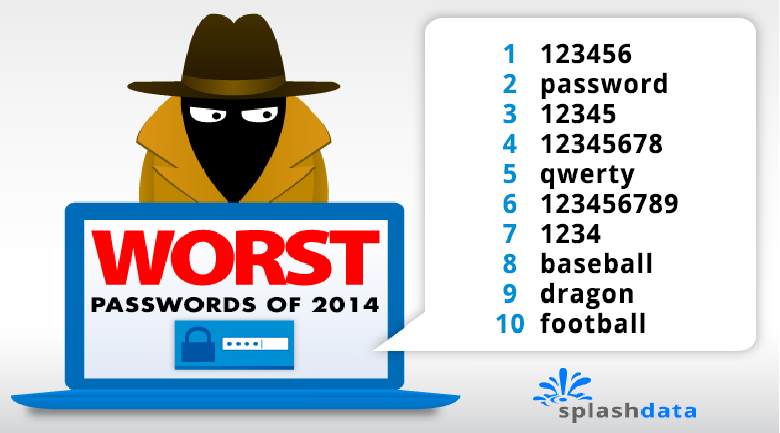
SplashData released their yearly list of most common passwords on the Internet and offered the 25 most frequently used passwords throughout the World Wide Web. It seems as though numbers, superheroes, and the infamous “qwerty” are the hot contenders. The list was acquired from analyzing 3.3 million leaked passwords in 2014.

Mark Burnett, an online security expert, helped SplashData compile their list and says that the list shows people are becoming more aware of better password usage than they have been in years prior. He also mentioned that the top 25 only accounts for 2.2 percent of the exposed passwords.
We’re vulnerable online, but you can do something about it
The full list includes:
- 123456
- password
- 12345
- 12345678
- qwerty
- 1234567890
- 1234
- baseball
- dragon
- football
- 1234567
- monkey
- letmein
- abc123
- 111111
- mustang
- access
- shadow
- master
- michael
- superman
- 696969
- 123123
- batman
- trustno1
With continuous proof of our online privacy being extremely vulnerable, it is important to create passwords that will protect you. While there is a fine-line between astoundingly easy and incredibly fool-proof (i.e. the time that I got an e-mail saying someone in Russia tried to hack my Gmail account so I changed my password to a 50-word phrase and have been regretting it ever since), coming up with a safe password may be easier than you think.
Choose a proper password
For example, base your password on something you like. Say you’re a fan of The Rolling Stones. You can make the band your theme for passwords and change up the variation depending on security requirements. You can do: rollingstones1, Rolling1Stones, YouCantAlwaysGetWhatYouWant, etc. If you have a theme for passwords, it may be easier for you to keep track of what goes where.
However this may still be tricky to keep track of and further assistance may be required. For this, I would suggest the use of LastPass. It is a free, online tool that allows you to store all of your passwords in one password-protected place. LastPass also offers “Enterprise” which is password security for a company.
Whichever route you choose, know that it is possible to keep yourself safe on the Internet. And let us all make a pact to eliminate the usage of “1234” and “qwerty”.

