


Getting organized
 Over the past year, I’ve personally moved most of what I do to the Google suite, from using Gmail to Google Docs, and I typically keep my “to do” list in the sidebar of Gmail. Recently, I discovered a Google chrome extension that allows my “to do” list to be more visible, rather than it being a separate pop up or having to peek at my Gmail tab over and over.
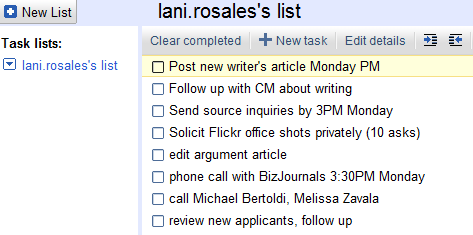
This extension called “New Tab to Tasks” is pretty self explanatory- it opens your “to do” list any time you open a new tab. If you’re like me, you have at least five tabs open at all times, and you probably “ctrl + t” for new tabs all the time and now, you can see your task list frequently, keeping your list top of mind.
This is what it looks like when you open a new tab… it’s minimalistic, you can add tasks straight from the new task, check of completed tasks and it’s a simple install with one click of a button:
Download the Google chrome extension by clicking here.

