


Google RSS Feed Reader
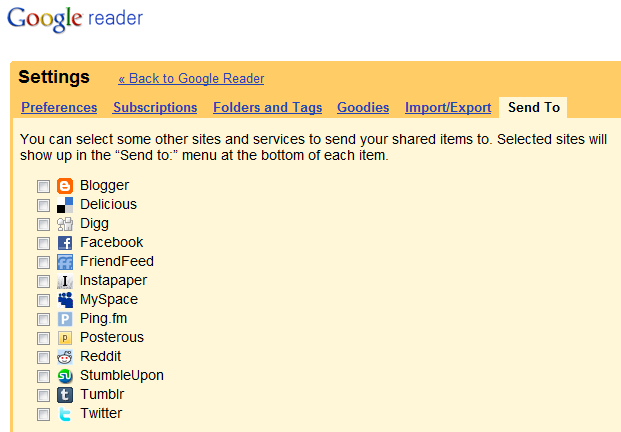
Google Reader has some hidden functions that are pretty dang cool if you haven’t played with them yet (click here if you want to learn what google reader, rss or feeds are). Imagine a world where you can check out your feed reader and broadcast your shared items to your preferred networks. Ah, it’s reality, simply open your google reader, click “settings” on the top right, then the “send to” tab on the upper right and simply select where you’d like your shared items to go:
How to apply this to your business:
If you have created a tumblr blog as a single property website like we talked about last month, you can share items you find on your reader that are pertinent to your listing’s neighborhood, city, school district, etc. with a simple button. I’m thinking 4th of July parade coverage, new school rankings or HOA info that comes across your feed reader would be highly applicable and this saves you several steps. This works if you host your blog on Blogger as well.
If you connect with consumers on Twitter, you can easily share information with them there. Stories on law changes or perhaps sales stats that apply to a buyer or seller’s needs as you’ve deemed necessary (you are the area expert, no?) would be helpful. If you don’t have your own blog’s RSS feed piped into Twitter (by using Twitterfeed or other tools) or you simply don’t want to bog down your Twitter account with your prolific writing, you can share your own articles selectively this way. This works for Facebook as well.
By opting to share content that you or others have written on Instapaper, you can print blogs in newspaper format either for yourself to read later or for your clients as a neighborhood aggregate.
There are many ways I can see Google Reader sharing options as streamlining or supplementing your blogging and microblogging efforts, what ways can YOU add?

