




Saving time and effort, one shortcut at a time
While some people shop for the latest and greatest ergonomic mouse, and others brag that their laptop brand of choice has the smoothest clicking experience, people like me roll their eyes. Why? I hate the mouse. There, I said it. Why? Because I’m typing all day, which means my hands are on a keyboard, so while it may sound absurd to you that I don’t care to take my hands off of the keys, those moments of having to stop my rhythm and use the mouse really add up. We all already know CTRL + C is copy, CTRL + V is paste, and so on and so forth, but do you know about CTRL + Z (undo) or CTRL + Y (redo), or WINDOWS BUTTON + F (find files)?
I’m not alone in my hatred of the mouse. Not that I thought I was, but a German startup founded this year is the answer to my prayers; enter KeyRocket, a killer productivity app that you download, and while you’re using your software, the app runs in the background and makes suggestions of keyboard shortcuts you can use, which is much more helpful than memorizing the exponentially expanding list of shortcuts.
Context-aware tips pop up as you use your computer
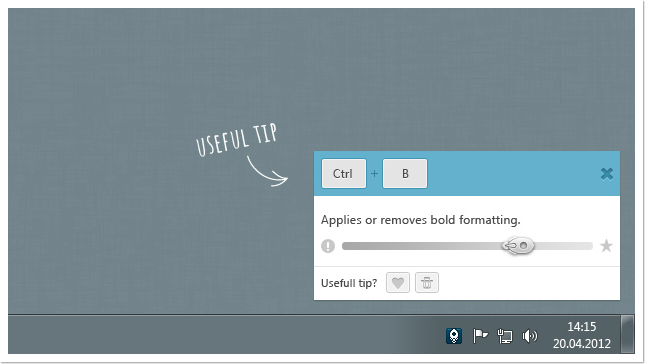
KeyRocket tracks your work on Windows Explorer and Microsoft Office products to show which shortcuts you could be using instead of using the mouse. All tips appear in a pop up like so:
Fascinating statistics on your wasted clicks is built in
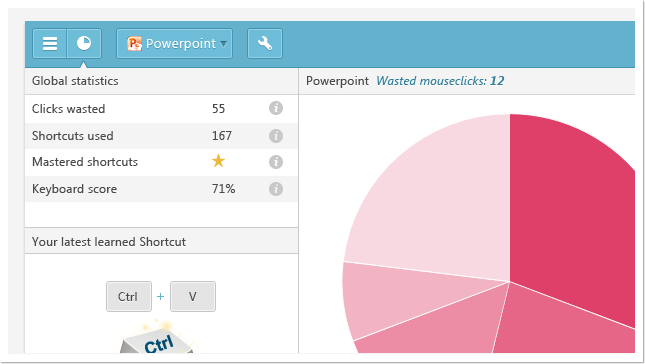
Learning shortcuts is simple, and there is even a reward system that helps you remember the shortcuts. What we were also fascinated by is the statistics reporting offered, which shows you how many wasted opportunities you had by not using shortcuts, and how many shortcuts you have actually used.
Windows and Google Chrome now, Mac coming soon
The program includes a searchable database of over 1,700 shortcuts and supports Windows 7, Windows XP and Windows Vista operating systems, and an Apple OS X version is planned. Because it simply runs in the background, there is no configuration, so anyone can make use of the app.
There is a free version as well as a paid version for the context-aware shortcut suggestions, and KeyRocket recommends shortcuts shown in the menus and ‘secret’ shortcuts shown only in help or support documents.
For Gmail devotees, the company has even released a free KeyRocket Chrome extension that offers keyboard shortcut suggestions while you use your Gmail. Genius!
Quick videos about KeyRocket
[pl_video type=”vimeo” id=”42270291″]
[pl_video type=”vimeo” id=”49589830″]

