


 Use some of Google’s muscle for keyword research
Welcome back, hope you had a safe and enjoyable holiday break. My wife and I used our time to put in new kitchen counters and tile….but, that’s a whole other post. Let’s get to today’s SEO Tip.
Keyword research can be both intimidating and time consuming, but why should YOU do all the heavy lifting? Google has a fantastic tool made specifically for doing keyword research. And…. IT’S FREE! Of course, they hope you’ll use it for an AdWords campaign and send them some money in return, but that’s not required.
It’s not only free, it’s simple. Seriously simple. In just a few minutes you can have a pretty decent and reliable list of keywords you can use to start optimizing your site.
You’ll also need some kind of spreadsheet or database tool – Excel works great. You can use this process without a spreadsheet, but don’t hold me responsible if your brain explodes inside your skull.
 Google Keyword Tool
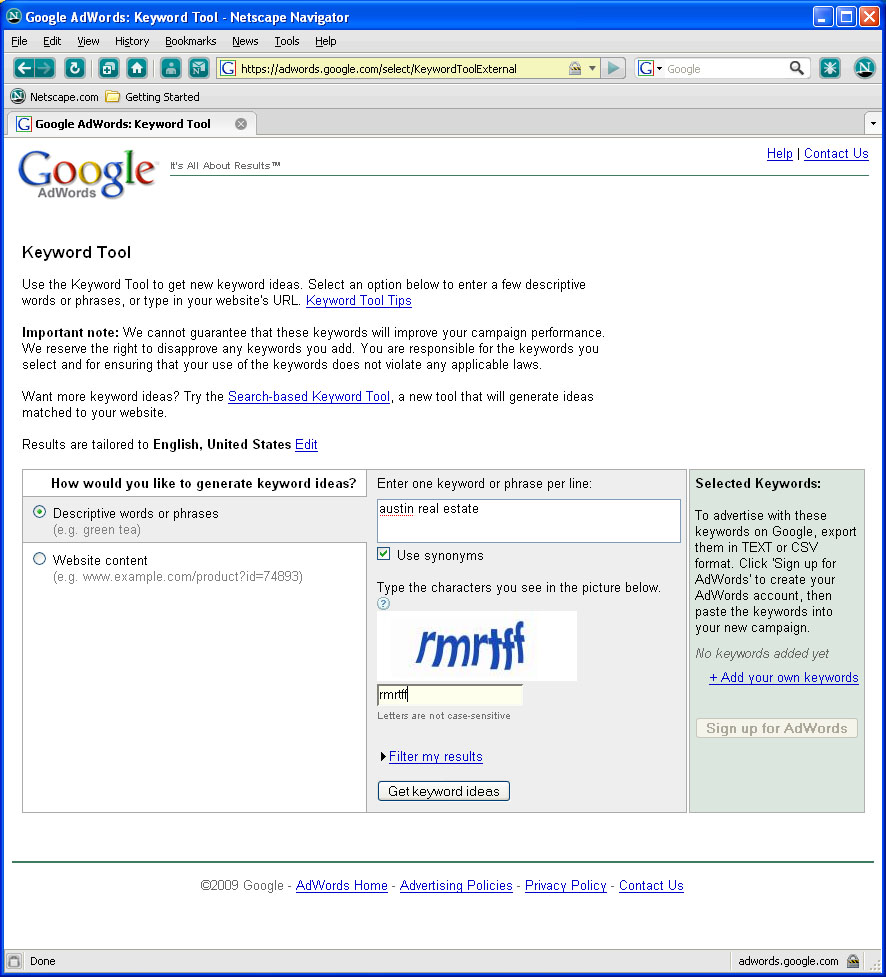
Let’s get started by going to the tool – open up your favorite Web browser – I’ll be using Netscape for my screen shots. Go to: https://adwords.google.com/select/KeywordToolExternal Don’t panic when you see it talking about AdWords – you won’t need to give Google any money (they have enough already).
In the center column, enter a search phrase you think people might use to find your site. I used “austin real estate”. You may or may not see the captcha image, depending on if you are logged in to a Google account or not (I use netscape when I don’t want to log in and have Google know everything I’m doing). Leave the “Use synonyms” box checked. Click on the button labeled “Get keyword ideas” and let the magic begin!
In just a few seconds you are presented with a list of potential keywords. The default screen will show you three data columns (along with the keywords):
- Advertiser Competition
This bar is a relative gauge as to how many AdWords accounts are bidding on this phrase. The more green it is, the more competition you’re likely to have for that phrase. Both in the paid and organic listings. That does NOT mean you shouldn’t use those words/phrases for your site, just expect that you’ll have to fight for every click you get. - Local Search Volume
For many of your sites, this is probably the most important column. Google is able to locate (reasonable well) where people are located when they search for things – and where YOU are when you run the tool. This column tells us approximately how many searches were conducted in a recent month for each word or phrase, in the same geographic area as you are in. We’ll probably pick several phrases from both ends of this column before we are done – I’ll explain more later. - Global Search Volume
This column indicates how many times (based on a monthly average) a phrase has been used from all over the world. This could be very important to know for some phrases. In my list, the phrase “moving to austin” is searched an average of 2,900 times a month, “austin lease” is searched roughly 4,000 times. If I was a Realtor you can bet I would give some thought to targeting those phrases.
Cleaning the List
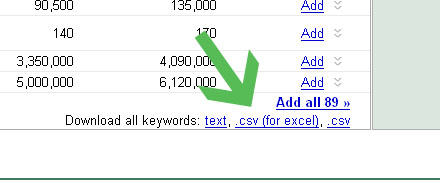 The list Google gives us is not bad, but it certainly has some words and phrases that really are not worth our time. This is where Excel comes into play. Scroll down to the bottom of the page and click on the “export to csv” link.
Remove some paid competition
Now we can have some real fun. When you open the file in Excel, you’ll notice that the Advertiser Competition image has been converted into a numeric value ranging from 0 to 1. We’ll start our clean up with this column. Right click it and select “sort, largest to smallest”. Give careful consideration to anything with a value of “1”. Most of the time those words are so generic that that only way you’ll rank for them is if you pay for listings. That eliminated 15 phrases from my list. Carefully review the next several places on your list – are the words too generic for you to compete with the people buying placements? Possibly, but don’t chicken out and delete too many.
 Find strong local words

Now lets see what phrases are popular near us. Sort the Local Search column from largest to smallest. Not many surprises here. Since this is our first pass through the process, these words are still pretty focused. I had a couple surprises in my results though – two non-geo-targeted phrases are quite busy in the Austin area. Combined, the phrases “ranch homes” and “ranch homes for sale” had more than 225,000 searches in the month of October. That’s worth looking in to.
It can be difficult to determine a cut off point, but carefully review the words near the bottom of this list and delete those that have low search numbers. However – before you delete them, glance over at the Global Search column and make sure it also has low numbers. This removed another 21 from my list. While we are near the bottom, study these phrases carefully. These are probably long-tail phrases with possibly only a few hundred searches a month. Your initial thought might be to not bother going for these and focus only on the phrases with higher numbers. That would be a mistake. People who search with long-tail phrases are (usually) beyond the research phase and are ready to make a commitment. You want those people to find you.
Find strong global words
I suspect that most of you will have at least a few phrases that do better globally than locally…and still apply to your market. Go ahead and sort the Global Search column now. Compare these numbers to the local numbers to see if anything stands out. Like with the local values, review the words near the bottom and delete the few that don’t apply to you, or you feel are not strong enough. This removed another 7 phrases from my list. Yikes – I’m now down to only 46!
Remove ridiculous words
Admittedly, not every word and phrase that Google suggests will make sense for your site. Scan your list and remove those. I deleted “512 austin” from mine.
Lather, Rinse and Repeat
Now it’s time to really let Google flex its muscles. Go back to the first page of the AdWords keyword tool, copy ALL of your remaining words from the spreadsheet and paste them into the keyword/phrase box. Click “Get ideas”
BAM!
We started with one phrase, jumped up to 90, cleaned out about half, and now we have a list of 200. Repeat this process a few times and before long you’ll have a very accurate, very targeted set of both local and global search words you can use on your Web sites.
More than one road to Rome
If you do this enough times you may eventually end up with list containing every “good” phrase that you should be using, but that could take a lot of time. Instead, go back to step 1 and use a different starting phrase – another one you already think is good but didn’t get found in your first or second trip through this process. For example, the phrase “austin vacation rentals” gave me another 200 phrases I could start reviewing. You can see, it would not be difficult to build up several good lists of keywords.
Now you have no excuse for not using targeted words in your web content, and don’t have to fear pulling a muscle while you gather them. Have fun!

