


Facebook has 99 problems…
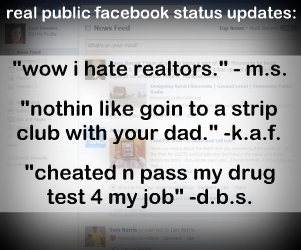 …and being private ain’t one. Facebook continues to make headlines due to security holes that let friends view your private chats to your privacy settings continually being reset to default to public meaning anyone can see anything you do ranging from status updates to your phone number and email to who your friends are.
The reason this all grabs headlines is Facebook’s cavalier attitude towards data claiming that it wants to be set free and an attitude that privacy inevitably will die given current internet and social networking trends, so why not stick a fork in it and give it to the highest bidder (or in Facebook’s case, any bidder at all, money or no money)?
Facebook is under fire not only for resetting privacy settings on all accounts but for making it difficult to understand with numerous iterations of settings users must discover by clicking around (it isn’t all on one page like you’d think).
Would you want to know if your status updates are public?
I asked on Twitter, “if I learned your facebook status updates were public for everyone to see, would you want me to tell you?” This question got a resounding “yes,” and I had over 20 people immediately ask me via direct message how they could tell.
Without going into privacy settings or freaking out over how do click on X number of links to get to specific settings, a new free service has launched called “Open Book” which searches and reveals all public status updates (meaning a user has permitted their status updates to be seen by anyone).
A quick peek shows some embarrassing information which is the point of their whole project- they agree that Facebook privacy settings are not easily understood by the common user, namely minors (which is a massive majority of those being aggregated on Open Book). OpenBook was developed to show the flaw of Facebook and acts as a statement against Facebook’s attitude toward privacy.
The way I quickly answered those 20 people was to look at their latest Facebook update, for example, “Bella turned 7 today and everyone at Casis Elementary was so wonderful to bring gluten free cupcakes” and went to Open Book, did a search for “Bella, Cassis Elementary” to see if it showed up or not. If it showed up, the status update is public for anyone to see but if it didn’t, the user had effectively made their status updates private.
Why does this privacy matter?
Why does this privacy matter? To some it doesn’t, but to the fake mom above who only has 25 Facebook friends and talks about intimate details of her children by name, allergies and school, this can be frightening.
And as an agent, if you’re speaking openly to your small group of real Facebook friends about how you just got 1% bonus on a listing on the north side, you don’t want the DOJ up in your business insinuating you’re price fixing by talking dollars. As a broker, you don’t want your private rant about the dumb new agent to show up to the world when you only meant it to your family and friends since you don’t associate with industry professionals on Facebook.
What do you think about all of this? Do you know if you have private status updates or not? Let us know if OpenBook surprised you as it did so many of my Twitter friends who thought they were private.
UPDATE: to see if all of your Facebook settings are private, visit ReclaimPrivacy.org which will scan your settings and show you immediately if you’re “secure” or “insecure” with several settings.
To make status updates (and other things) private in Facebook, go to account > privacy settings > personal info > set all to “friends only” to be fully private.

