


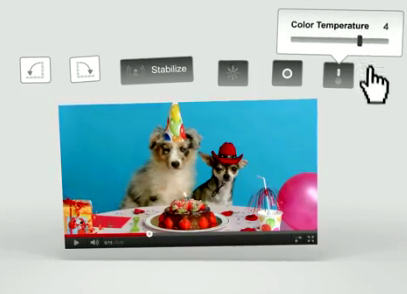
YouTube editing for existing and new videos
YouTube has launched onsite video editing allowing users to edit uploaded YouTube videos while keeping the same URL so videos don’t lose view counts, simply click “Edit Video” on your video’s page. The editing tools are not as sophisticated enough to replace a real estate videographer’s editing suite, rather is meant for simple fixes, mostly by amateurs.
YouTube Software Engineer John Gregg notes the new options for editing:
- Stabilize hand-held footage
- Rotate videos
- Boost colors and contrast
- “I’m Feeling Lucky” auto-correct
As a result of their partnership with Picnik, YouTube offers new aesthetic effects just as offered for their photo editing tool:
- Black & white
- Lomoish
- Cartoon
- Cross Process
- Thermal and more…
Using new editing tools in business
Videos about brokerages, teams, listings and subdivisions currently in a brokerage’s YouTube library now have an excuse to be “relaunched” on the company blog or newsletter with some simple edits for correction or even for fun. This could be the answer for the agent with a zero dollar budget with no tech savvy- the editing tools are super basic and if someone has enough technical ability to upload a YouTube video, their skills are high enough to use the editing tools.

