


What is MikeLike?
A few weeks ago, I noticed in my Google Chrome when I right click on a photo, a small blue icon and the words “Pin to MikeLike,” and red alarms immediately went off in my head – who the bleep is Mike and why is he up in my Chrome? I’ve never heard of MikeLike, nor have I ever installed anything from the Pinterest clone, so where did this come from?
I put on my Sherlock Holmes hat, stuffed my pipe with pretend tobacco, and began sleuthing. First, I headed over to the MikeLike site and read their about page and terms, and found nothing about uninstalling MikeLike from Google Chrome. Maybe I accidentally downloaded some Google Chrome extension, so I dug through all of my Google Chrome settings and there was nothing called MikeLike that I could delete or uninstall.
Nothing? I checked my browser history that goes back nearly 12 months, and I found no instance of having visited anything named MikeLike. Google searching didn’t reveal much information about it, so I headed over to the Google Chrome Web App Store and found a MikeLike extension, but it wasn’t installed on my Chrome.
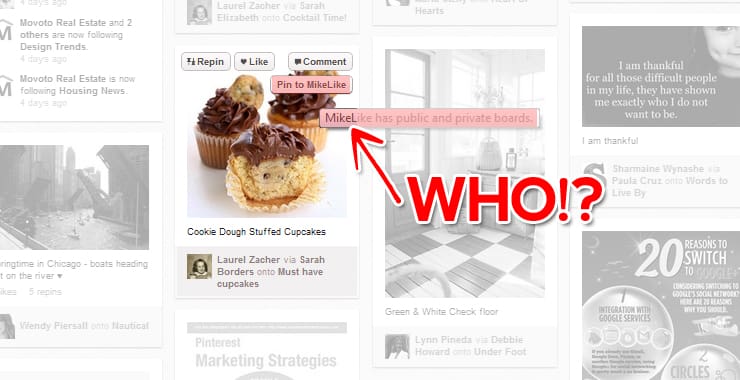
The mystery deepens
This mystery is frustrating. Who is Mike? Someone please tell me! In desperation, I ran a sweep on my computer to make sure it wasn’t some malware I had been exposed to, and all was clear. I quickly decided that Pinterest was out to get me, but just in case that wasn’t true, I kept searching for answers.
With a little digging, I found someone complaining that the Pinterest Right Click Google Chrome Extension had added the ability to “Pin to MikeLike,” so I searched to see if I had downloaded that extension. I could tell from the “Add to Chrome” button on the page that I did not have it installed.
It seemed like a dead end, until I remembered that I had tested out several Chrome Extensions for pinning to Pinterest and settled on the “Pinterest Button” which is not designed by Pinterest, so it can technically make any changes it wants to, even if it is just one guy who built an app once upon a time.
By uninstalling the “Pinterest Button” Chrome extension, there was no more “Pin to MikeLike” when I right click an image, and when I am in Pinterest, I no longer have a stupid extra button when I hover over a picture.
Problem solved, what was the lesson learned?
It may seem minor to some, but this felt like a major violation to me – the brand was inconsistent and not even named the same thing as the Pinterest Button extension, and there was no way for most people to stumble upon the answer as to who the hell MikeLike is. I panicked and wasted a lot of time trying to uninstall this and that, and to no avail. MikeLike may be useful for some, as it offers private pin boards, but through no fault of Pinterest, a rogue extension downloaded to Chrome led to a great deal of confusion.
The lesson: when installing Chrome Extensions or any sort of browser tool, try to use the official extension from the source if you can, even if the functionality lacks. Although there is no official Pinterest extension on Chrome, the closest, most legitimate extension is the Pinterest Pin It Button (by Shareaholic) which works just fine and doesn’t force you into liking Mike, who is still a mystery person.

