


 The real estate industry is comprised of hundreds of thousands of people, many of whom have no background in advertising or marketing which means that sometimes the independently launched marketing campaigns lack polish.
So let’s take a quick peek at some easy ways to jazz up your marketing and the example below is a flyer that was in front of a house as the marketing collateral… I point this out because you may not now how ridiculously common it is for people print the MLS listing and put it in a flyer box in front of a house and it looks like this:

Making it So Much Better
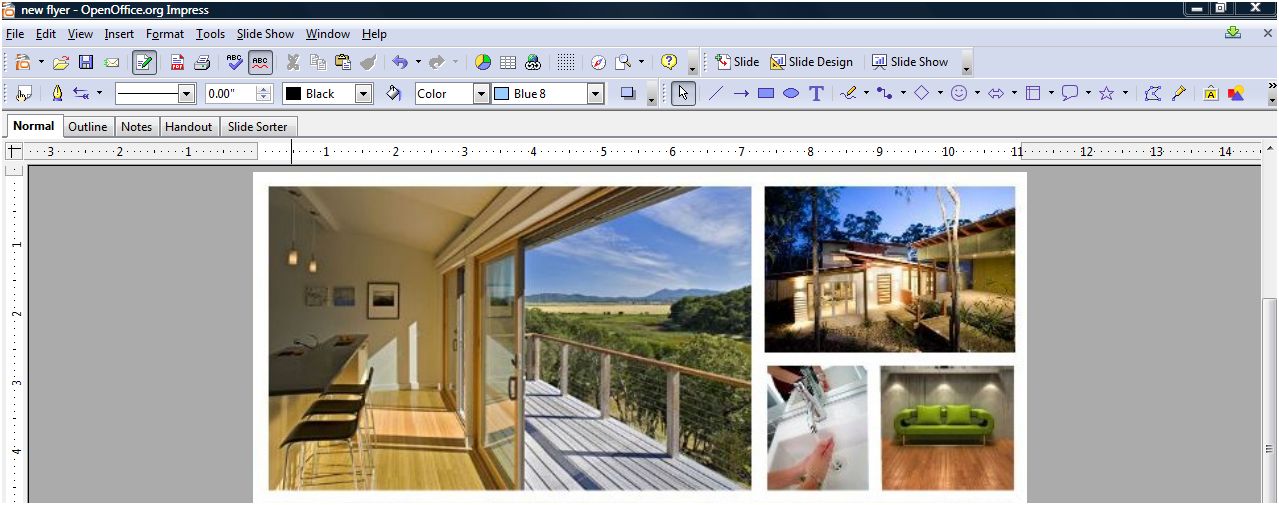
Oh this won’t do. Any effort you make is better than this, but let’s awesome-ify this flyer in under 30 minutes (60 for the over-perfectionist-tweakers). First, get the best images you have of the home you’re listing (I prefer professional photography), you’ll just need four. Open your Power Point, Open Impress or Photoshop, whatever it is so you can simply slap up some images. Insert the four photos into a new document and resize it to look like this (with your favorite shot as the lead):
Now For the Pizazz!!
So this is the cool part- under your pictures, we’re going to add the pizazz! Go to the Idee Inc. Lab and click on the color palette on the right which will populate creative commons images (images that are legal to use) from Flickr that have the color(s) you select! For this flyer, we’re going to select two shades of green because we’re featuring a sustainable home but for your flyer, you may be advertising a brownstone building so you would select browns and tans, or you may be publishing materials for an oceanview property so you’d select aqua and navy.

Bringing It All Together
So now we have an awesome palette and to grab it, use your screenshot tool to capture the image. Now, we’ll pull the image you just created and put it into the document with the four images you already gathered:

And Voila!
Now either select all the images and group them and save them as an image by right clicking and “save as image” (or in Photoshop, just save the image). Now open up Picnik (the Flickr photo editor) which I use as a substitute for Photoshop. All I did was crop this image, add the word “GREEN” in white and faded it 30%, used a clean font to very simply line out the details but I don’t show the price. Why? Price changes lead to reprints and if you’re using high quality paper and you don’t want to kill extra trees, don’t list the price. Why else? Because the most important detail on this flyer is the web address at the bottom- flyers only give you the possibility of analyzing metrics if they direct a buyer to the website. Here’s the final product:

The Most Killer Idea OF ALL!
The flyer above can easily be created in a large format, sent to your local sign shop and printed as the yard sign for your listing. Now THAT is a killer idea- it’s unique, very attractive, eye-catching and can be printed as a two-sided sign that impresses your sellers and your buyers, it’s a win win win! If you and your seller are eco-conscious, the flyer can also be shrunk down to business card size and printed as business cards… there are now business card holders that can be attached to signs that are weather resistant and with business cards, sellers can carry a stack of those bad boys with them and hand them out- brilliant!
Show Us Whatcha Got!
This project took me about 15 minutes to make and I’ve got something that stands out which all home sellers deserve even if their home is only selling for $30,000. I invite you to use this layout, make your own, but try to experiment and get away from the 1990’s standard templates that have come and gone… be brave with graphics, fonts and layouts! If you use any of these tips above in a flyer or have more to share, leave a link to it in the comments, we’d love to see!
Originally published September 13, 2008.

