



Print Solution
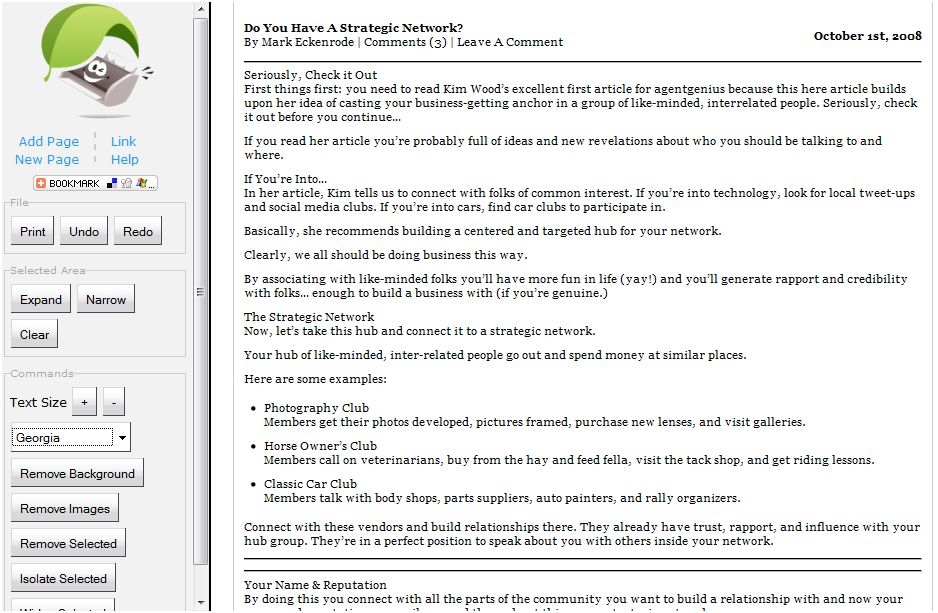
Sometimes we want to print a blog, a news story or a map but know it’s going to take the entire print cartridge to do so. In steps PrintWhatYouLike.com giving you control over what you print. Check this out- you go to PrintWhatYouLike.com and enter the URL that you want to print and it pulls up the site with the control panel on the left, like this:

Your Options
You can select limited areas to print rather than print the whole page’s content and expand and contract that selected area. What I find most helpful for saving ink and paper is that you can remove images and even remove the background which looks like this:

Then, you can choose the font that is easiest on your eyes and even select the size of the font which can do even more to condense the printing:
Be Green, Be Awesome
Not only is this an effort to save ink, paper and money, it makes it much more attractive to print out the reading you want to catch up on but can’t always be in front of the computer (which we discourage of course, lol).

