


Reppin’ the Reputation Tools
We’ve talked before about getting set up on Twitter and now that so many in the real estate industry are actively using Twitter, you should have the tested tools at your disposal to manage your Twitter experience. If you’re not using Twitter, that’s okay, we advise going all in to whatever social media outlet you choose, but if you plan on utilizing Twitter, make sure to be an effective user.
1. Broadcast Your Blog’s RSS on Twitter

One way to turn other people off is to use Twitter exclusively to broadcast your RSS feed, so if you choose to use TwitterFeed, be sure to remain active in the conversation or you will lose followers. It *is* important, however, to funnel your blog to your Twitter, especially with more people using Twitter in lieu of their feed reader.
2. Find Local Twits

A mistake many people in our environment make is to follow hundreds of other real estate agents when the most effective use of Twitter is to connect with local people who will likely do business with you (and you with them). It’s comfortable because it’s who you know, but be brave- use TwitterLocal to find people in your area and introduce yourself! We’ve said before and we’ll say it again- Twitter is like an after work happy hour; it’s less formal and everyone’s there to connect with people similar to them, so if the connection isn’t magical that’s okay, use this tool to find other connections!
3. Who’s Following You & Who’s Not?

Friend or Follow is by far the most intuitive tool for visualizing who is or who is not following you and is designed by fellow Austinite Dusty Reagan. The site is new and has some bugs (it doesn’t update quickly, doesn’t have ajax and doesn’t yet offer a bulk follow/unfollow feature) but is still by far the easiest tool to manage who you follow and don’t. Some people follow everyone that follows them while others are highly exclusive (I recommend being in the middle by following people that are in your area, your social scene, or beneficial to your network).
4. Catch People Who Quit Following

One of the massive problems with Twitter is that you don’t know who stops following you, when or why but with Qwitter, you get an email telling you at what point (meaning with which tweet) someone unfollows you so you can get a feel for if you’ve said something offensive (which will be followed up by multiple unfollows) or if you’re not active enough (which happens with a slow trickle of unfollows). Don’t stalk unfollows or take it too personally, I advise using this as a means to modify your use of Twitter.
5. Check Your Twitter Grade

I actually think Twitter Grader is stupid, but it’s fun and everyone seems to like it. Go see what your Twitter grade is (and understand that as an overachiever, I don’t like that mine isn’t perfect so I don’t like blabbing about my “grade” especially since I’m still figuring out how to “fix” my “grade”). You can also check out the “Twitter Elite” and drill it down by city which is kind of cool.
6. Check Your Twitter Influence

I’ve found great success on Twitter for various ventures in part because of my personality which even before Twitter was to be a connector (oh, newfriend, you’re in San Mateo? have you met my buddy @vickimoore who’s in SM also?). Being a connector helps grow your network which in turn grows your “influence.” It’s important in the same way that your website or blog being a result in a Google search is. Checking your “Twinfluence in seconds and see your reach.
7. Get Notified of Keywords & Your Name

We’ve talked about this before- it’s super easy to set up an alert to go to your email any time anyone twitters about your name or the keywords you’ve chosen. TweetBeep is like Google Alerts (which by the way, you should set up for your Twitter name in case people use it in a blog).
8. Monitor Keywords Live
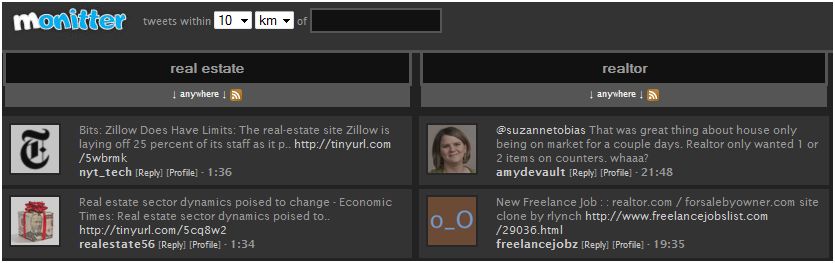
Monitter is great if you’re researching for a blog post, you can check out who’s talking about a new retail project or a specific subdivision or a technology you’re using. It’s live and easy to visually see what the conversations are and easy for comparing keywords to each other (especially with frequency of use).
9. Scan & Sort Followers

With TwerpScan, you can scan your followers based on the number of followers they have, their reputation and more. The cool thing about this application (which is a work in progress I might add) is that it is sortable- a rare function of Twitter-related apps. You can reorganize and sort followers based on their name, reputation, number of followers, etc.
10. Oh Yeah, Have Fun!

There are many non-Twitter applications that allow you to broadcast your activities directly to Twitter. Two of my favorites are Blip.fm where you can search for music, blip it (aka play it publicly in a timeline like twitter) and actually tell it to broadcast to Twitter where you can publicly admit that your favorite song is, in fact, Ice Ice Baby. Another is Daily Mugshot where you photograph yourself daily and it plays sequentially in a slideshow which has no networking or professional value but is fun to see people’s hairstyles, hats, notes and fake mustaches change daily!
Now You’ve Got It!
Twitter is an amazing networking tool and with these tools, you can make Twitter work for you!

