


From time to time I think that we forget, in RE.net, that there are some old ideas that may help some of the newer readers.
Do it Yourself E-mail Campaigns
I am forever trying to find low cost ways to help agents get the job done. Lots of folks spend countless dollars on e-mail newsletters and automated e-mail systems. First, let me invoke opinion here – no one wants to be on your e-mail campaign list. They want information and yes, you need to remain relevant and in touch. So, don’t wast your money on canned e-mail letter campaigns.
Find a pace and pattern that fits you. Yes, you’ll find yourself sending the same e-mails over and over again, and here is a way to save some time and effort.
E-mail Signature’s to the Rescue
I am basing this on Outlook, but the pattern is similar for Mozilla’s Thunderbird. If you don’t have Outlook, you can get Thunderbird for free.
This is going to be a quick tutorial on using e-mail signatures as routine responses to your clients and customers.
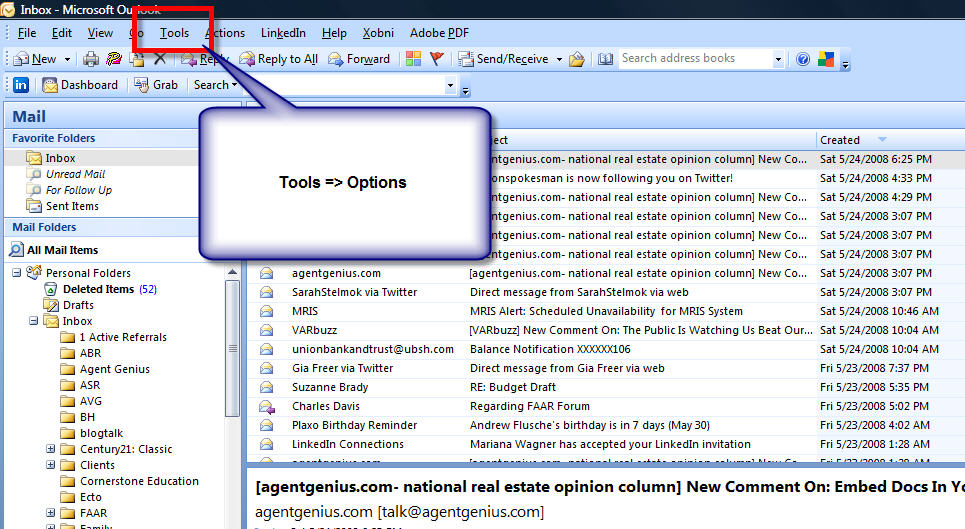
First open up Microsoft Outlook, and go to “Tools” and then “Options”:
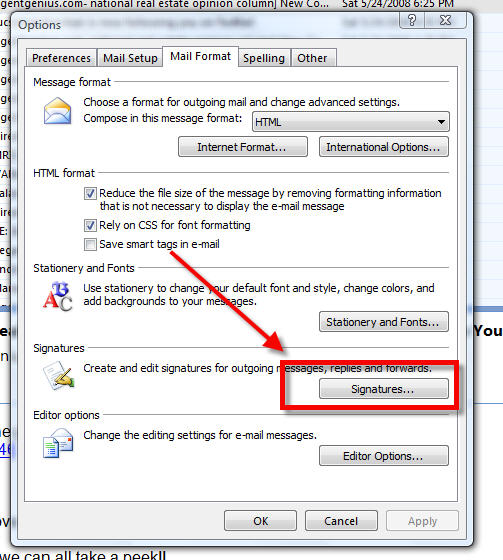
Once you’re opened up “Options”, click the “Mail Format” tab and “Signatures” down toward the bottom of the window.
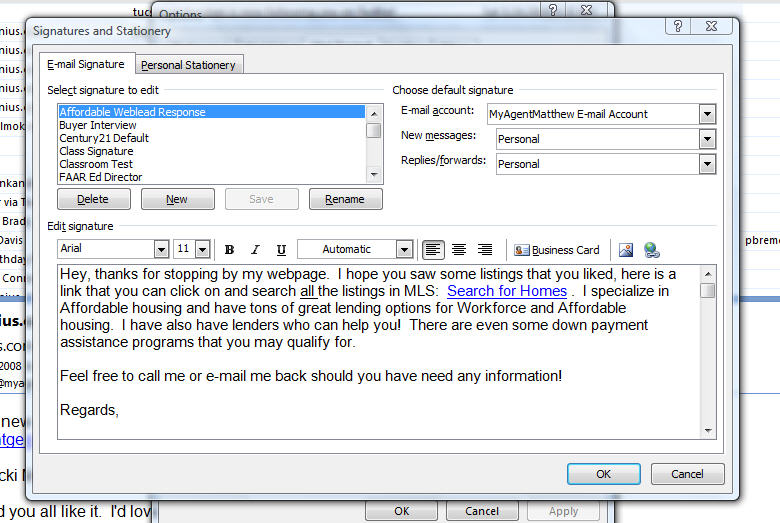
Once the window is open, you can see a list of your current saved signatures. Most people only have their master signature. You can see that I have several, including one titled “Affordable Weblead Response.” (This was back when I referred to potential clients, as “leads”) Below you can see a typical response that was sent when consumers would request additional information about “affordable housing.” I sent it so often that I simply created a signature file.
Each time that I received a request for workforce housing, I opened a new e-mail, I can click on the “Insert” tab and then select the “Signature” button. A pop-up list will appear and you can then insert your e-mail response. Note: If you have a signature that automatically populates when you open a new e-mail, it will still be there and will be below the signature file that you enter.

Now that your response has been entered, make sure that you go back and tailor it to the client’s actual request. I’ve found that adding “Mr. or Ms.” and their last name has been a good way to start off. Potential clients don’t wish to be treated with a canned response. They want to know you’re real.
This is particularly good if you create HTML based e-mails that have links to resources, and maybe contact information for a few lenders. I’ve created signatures for each listing, with photos and links to YouTube videos of the house. Therefore, each time you get an online inquiry about your listing, you can automatically send the e-mail AND CALL THEM. Let them know that you’ve sent the information they requested and you wanted to follow up and see what additional information they would like.
I would also recommend that you not deliver your entire buyer or seller interview without speaking with the clients and getting permission to send such requests to them. The ultimate point is to get a personal meeting as soon as possible. This technique is especially good for providing routine information to clients after the meeting.
Once you’ve got your list of signatures setup, you should setup dates, from the point of initial contact, in which to deliver phone calls and e-mails in alternate patterns, and make those plans on your calendar, with reminders.
Numbers tell us that internet contacts need to be incubated for between 9 and 12 months. So, set down and write out a plan to keep in contact with personal relevant information. Most of these potential clients have tons of agents possible sending them stuff. The competition tends to fade away after the first 30 days or so.
Hope this is useful for you!
Good Luck!

