



I Have Twitter, What Now?
Now that you’ve set up Twitter and are friends with agentgenius and I, let’s take the next step. You know how to go car shopping and you have an idea of what you need, but the bottom line is that you need something with wheels that drives- you may be prepared for 340hp or you may really only need a simple sedan. This brings us to Twitter applications and what program you open on your computer to access Twitter. Pick a car that works for you and gets you from point A to point B.
Web Application
You can go to twitter.com and twit directly from there- it’s fast and easy. There are limitations though, mainly with how the messages appear and it is difficult to see their order.
Snitter Application
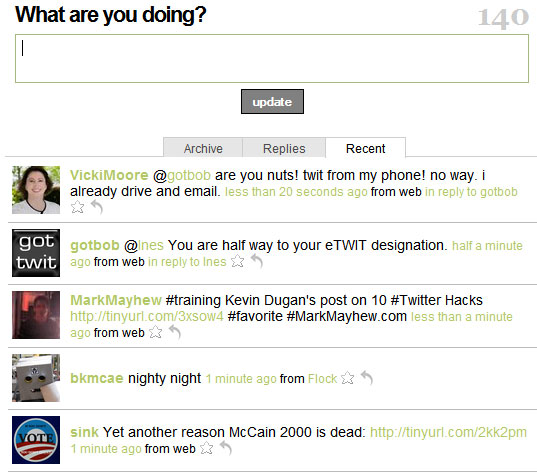
Snitter is the first application I used- I didn’t like on the Web App that I couldn’t see which messages were directed at me from the general twits from my friends. Snitter works on Mac & PC but on my PC froze frequently or would simply forget to check for updates, but at least it ran on its own web browser.
On most applications, some universal symbols are used like “@” which you click on a person’s avatar and you’ll write a public message that specifically addresses that user (in applications, it will make it a different color to that person so they can see it easily). The heart symbol means you’re making that specific twitter message a “favorite” and by doing so, you can access it later. People will explain in the comments the benefits of favoriting twits…

Twhirl Application
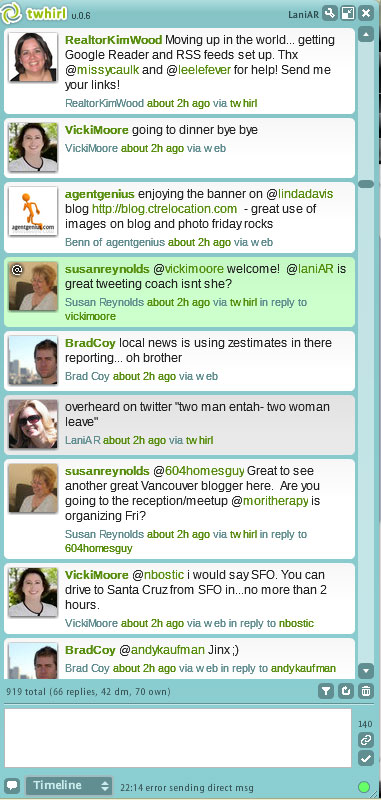
Now, I use Twhirl and it’s better so far than Snitter, so I’ll stick with it. Below is a screenshot of the Twhirl application that runs on its own browser as its own application. See in the screenshot below that some messages are colored differently? In one view, I can see my messages (in grey), public messages addressing me (in green) and what isn’t featured is direct messages to me (in yellow) and direct messages I’ve sent others (in tan) that the public can’t see.
When you hover your mouse over the face of another user, four symbols come up: “@” (see Snitter explanation), an envelope (for direct messaging another user), a heart (to favorite a tweet) and a forward button (to re-twitter) that automates these actions for you so you don’t have to type the other person’s username. At the bottom, you can organize tweets by timeline, direct messages and more (see bottom tab that says “timeline” and play around with it).
Spaz Application
“@housechick tried twhirl when both spaz and twh in earlier version. spaz would update at faster intervals than twh. got used to spaz. plus how can i NOT use something called spaz? i mean, really.” Check out Spaz here! AG’s own Kelley Koehler endorses it!
TwitBin Application
“@gotbob It embeds in FF and I can see it while I am working on webpages without the pop ups like snitter or twirl. It freezes up every now and then.” Check out TwitBin here.
TwitterFox Application
“@chrisjohnston it is a Firefox plugin that allows me to post from inside my browser without navigating to Twitter or Facebook.” Chris listed several applications that he has used but seems to have settled on TwitterFox- check it out here!
Hahlo Application
“@ResPres Hahlo.com is the closest thing to twhirl on the iphone. I only use it on the iPhone.” So if you’re an iNerd, check out Hahlo here so you can Twit on the go!
More Applications
Apparently, there are many more applications that allow you to organize and see your twittering activities in its own program/application/browser such as Tweeter, Twitteroo, and more (article about FriendFeed to follow, relax!). Let us know in the comments which application YOU use!

